LinkSquares Pricing in 2026: Cost and Pricing Factors

Huzaifa Sultana is a Marketing Associate at SpotDraft focusing on Organic Growth through SEO and AEO.

LinkSquares uses custom pricing, so there is no fixed monthly or annual rate on its website. The company does explain what shapes a quote, including contract volume, users, selected modules, implementation, and integrations. The final LinkSquares cost still depends on the scope each organization needs.
For teams comparing contract management software, the subscription should be reviewed alongside implementation, professional services, migration, API access, signing requirements, and future expansion. Depending on the proposal, these may be included in the quoted scope or licensed separately.
This guide breaks down what is publicly known about LinkSquares pricing, the third-party pricing data available in 2026, and the questions to raise before comparing LinkSquares with other contract lifecycle management platforms.

The LinkSquares pricing structure does not include public list pricing or a fixed monthly or annual rate. Buyers request a personalized quote based on the requirements of their deployment.
The public LinkSquares pricing page does provide a clearer view of what drives that quote. The company names contract volume, user count, modules, implementation and onboarding, and integrations or advanced requirements as pricing factors. It does not attach a fixed USD amount to any of them.
Third-party purchasing data on LinkSquares deals gives buyers some additional context. Vendr currently reports a median annual buyer spend of $31,000, based on 152 LinkSquares purchases. The displayed range runs from $5,999 to $79,200.
Those figures should stay annual because that is how Vendr reports them. They also cover purchases with different product and implementation scopes, which means the range should not be treated as a market average or a rate card for a specific LinkSquares package.
For buyers looking for transparent LinkSquares pricing, the proposal becomes the main commercial document to review. It should show the products purchased, the volume and access included, and any implementation or technical work attached to the quote.

LinkSquares lists five factors that influence pricing: contract volume, number of users, selected modules, implementation and onboarding, and custom integrations or advanced features. Each affects either how much of the platform the organization uses or how much work is required to get it ready.
Here is how those factors affect the scope of a quote.
Contract volume is one of the factors used to personalize pricing. The company does not publish volume bands or the USD amount attached to each band.
For teams using Analyze for post-signature contract management, the number of contracts determines how much agreement data needs to be processed and maintained in the repository. Migration scope can become broader when an organization has a larger historical contract estate.
Before requesting a final quote, count the agreements that need to move into the platform and estimate how quickly that repository will grow. The proposal should state the included contract volume and explain whether and how growth beyond that volume affects pricing.
That exercise also helps teams identify the contract metadata that needs to remain usable after migration.
The number of users is another published LinkSquares pricing factor, although the company does not show a standard per-user rate.
Access can extend beyond Legal once Sales, Procurement, Finance, or other business teams begin requesting agreements or working with contract data. That makes the structure of the user licenses important to establish before the quote is finalized.
Ask the proposal to show how many users are included, the access available to each type of user, and how added users will be priced if adoption grows.
The modules selected determine how much of the contract lifecycle the LinkSquares deployment covers. The company lists selected modules as a direct pricing factor.
Analyze supports post-signature repository and contract-intelligence work. Finalize covers pre-signature activity such as contract authoring, templates, negotiation, workflow automation, and approvals. LinkSquares Sign adds execution.
Customers using both Finalize and Analyze can move fully signed agreements from Finalize into Analyze, although LinkSquares documents specific rules around which information synchronizes between the products.
For teams evaluating the full contract lifecycle, the proposal should list each selected module and the functionality included in it. That makes it easier to compare the commercial scope with platforms that organize the entire lifecycle differently.
The Finalize workflow also makes contract redlining relevant when comparing how pre-signature work is handled.
Implementation and onboarding are part of the LinkSquares pricing calculation. The amount therefore depends partly on the work required to prepare the platform for the organization.
LinkSquares describes onboarding in four stages: discovery, setup and training, review, and go-live. Depending on the products purchased, that can include workflow assessment, Admin training, template creation, file analysis, uploads, and final configuration review.
The proposal should clearly identify any implementation and onboarding costs, explain which services are included, and state whether that work is included in the subscription scope or priced separately.
Teams with extensive customization or a large volume of legacy data should also confirm how later changes and product upgrades are supported. If active contracts need to move during implementation, ask how those agreements will be handled while the new environment is being prepared.
Custom integrations and advanced requirements can also affect LinkSquares pricing.
LinkSquares documents integrations with storage systems including Box, Dropbox, Google Drive, SharePoint, Egnyte, OneDrive, and others. The company also offers Salesforce integrations and has documented LinkSquares for HubSpot workflows.
The APIs have a clearer commercial boundary. Both Finalize and Analyze Public APIs are specialized add-on modules and require a separate licensing purchase beyond the core product suite.
Before the final proposal, map the systems involved in the contract process. That may include Salesforce, HubSpot, storage tools, email, ERP systems such as SAP, or custom applications. Then confirm which connections are standard, which need API licensing, and which require custom technical work.
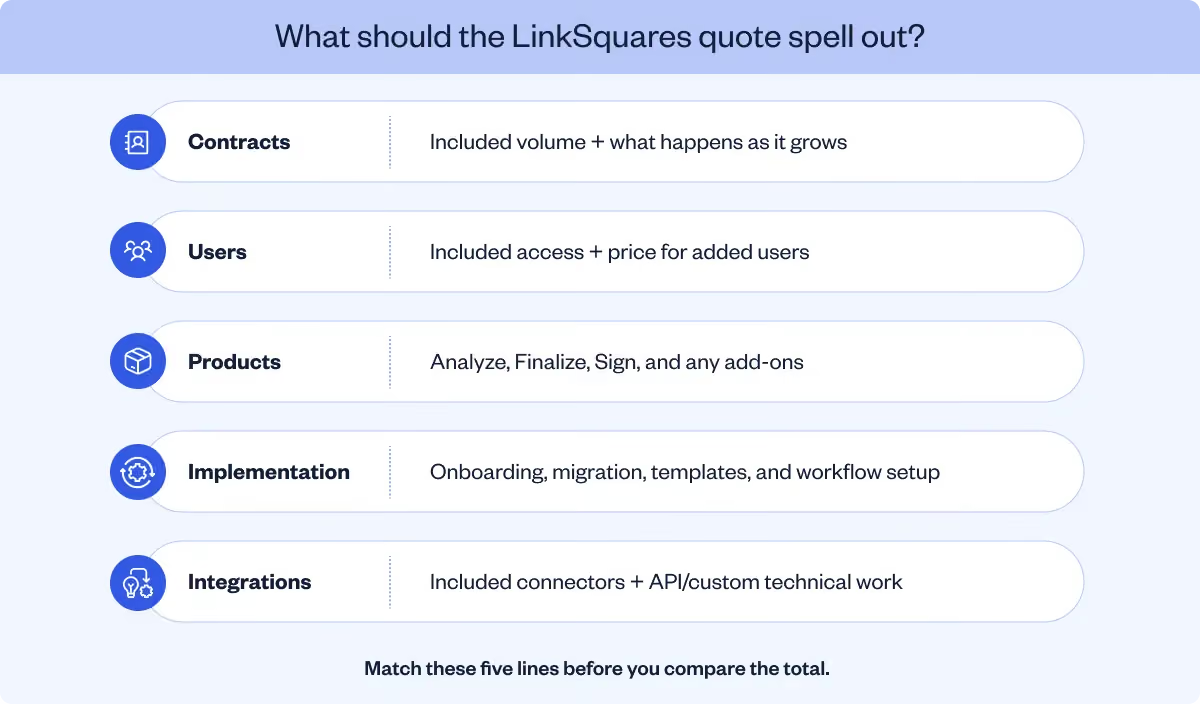
The total LinkSquares cost can include more than the software subscription. Its pricing page includes onboarding and advanced technical requirements among the factors used to build a quote, while its help documentation identifies some separately licensed functionality.
Breaking the LinkSquares pricing proposal into four areas makes the total cost of ownership easier to understand.
The subscription should show which LinkSquares products are included and the usage covered by the agreement.
That matters because a deployment focused on Analyze has a different scope from one that also includes Finalize and signing. The second configuration covers more of the contract lifecycle management process through drafting, negotiation, approvals, execution, and post-signature intelligence.
LinkSquares does not publish fixed module prices, so the quote should make the selected package clear.
LinkSquares states that implementation and onboarding costs are disclosed upfront. Its onboarding program can include account configuration, administrator training, agreement setup, workflow work, and file analysis depending on the products purchased.
Data migration deserves its own scope. Ask how many contracts will be moved, what metadata will be preserved, and whether the customer's team needs to prepare or clean files before upload.
These details determine how much work is covered by LinkSquares and how much remains with the legal, operations, or IT team.
Standard integrations and separately licensed technical access should appear separately in the proposal.
LinkSquares supports a range of integrations and also offers API access. Finalize and Analyze Public APIs require a separate licensing purchase beyond the core product suite, so buyers should confirm whether API access is included in their proposed commercial scope and what it costs.
LinkSquares also offers Technical Services for organizations that need custom integration work.
Ask which connections are included in the proposed package and whether custom integrations, Technical Services, API access, or other technical work are scoped separately.
LinkSquares says Admin training is included during onboarding, while broader user training should be confirmed for the teams included in the rollout. Customers also receive annual virtual training with their dedicated Customer Success Manager, along with access to the LinkSquares Academy and Knowledge Base.
Its support resources include tickets, email, and live chat.
Customer feedback makes signing and support worth testing before the commercial scope is finalized. One customer liked LinkSquares's organization, search, access to key terms, and templates, but reported that some signature requests were not sent and that support could take more than a day to respond. If signing is central to your rollout, send a real test request and confirm the escalation path and support coverage included in your proposal.

Also read: CLM software pricing: what contract management really costs in 2026
Some LinkSquares capabilities have licensing or usage rules that can increase the commercial scope after the core subscription has been defined.
The areas below are worth confirming before the agreement is signed.
LinkSquares explicitly identifies the Finalize and Analyze Public APIs as separately licensed add-on modules.
The company also offers additional professional services and Technical Services. Public professional services fees are not listed, so buyers should establish whether the work they need is already covered by implementation or requires a separate services engagement.
Professional Services and Technical Services can expand the scope of a LinkSquares deployment. Buyers should confirm which services are already included and which require a separate engagement, then compare proposals using the same implementation and technical requirements.
Contract volume and user count already influence the base quote, so growth in either area can affect future pricing. LinkSquares does not publish a standard expansion rate.
Signing has a specific allowance. Finalize users start with 10 free LinkSquares Sign Signature Requests. Once the allotted number has been used, additional Signature Requests must be purchased through the Customer Success Manager.

Teams planning to use LinkSquares Sign regularly should therefore include expected execution volume in the original pricing discussion.
Implementation and onboarding are documented LinkSquares pricing factors. The proposal should state the cost and scope associated with that work.
The requirements can differ by product. Analyze onboarding may involve file analysis and bulk upload of agreements, while Finalize implementation can involve template and workflow setup.
For larger migrations, tie the implementation quote to the actual number of contracts, required metadata, and the workflows being recreated. This gives Finance a stronger basis for assessing the first year and total project cost.
LinkSquares says small teams can start with a smaller scope and scale later, although it does not publish standard renewal increases or expansion rates.
The commercial agreement should therefore explain how future growth will affect LinkSquares pricing.
Before signing, confirm the following items in writing:
That checklist provides a much clearer view of LinkSquares cost over the full contract term.
LinkSquares sits in a market where many enterprise CLM vendors use sales-led pricing. The commercial difference often comes from what the quote includes rather than whether the vendor publishes one headline rate.
The table below compares several platforms using their current public pricing information.
Use the comparison table as a scope check: build each quote around the same contract volume, implementation work, integrations, support, and expected usage before comparing price.
Also read: SpotDraft vs. LinkSquares
SpotDraft supports the full contract lifecycle across creation, workflows, collaboration, signing, repository management, and analytics. Its pricing page says plans can be structured around users or contract volume, with in-house implementation, integration setup, and legacy migration included.
For a team comparing LinkSquares with SpotDraft, the product differences become clearer when each stage of the contracting process is considered separately.
SpotDraft Workflows connect intake, approval workflows, and signing so Legal can define how agreements move through the organization.
Business teams can work through the process created by Legal, while workflow rules keep the required reviews and approvals connected to the agreement.
That gives teams a practical comparison with LinkSquares Finalize: build one existing workflow in each platform and review how easily it can be maintained as the process changes.
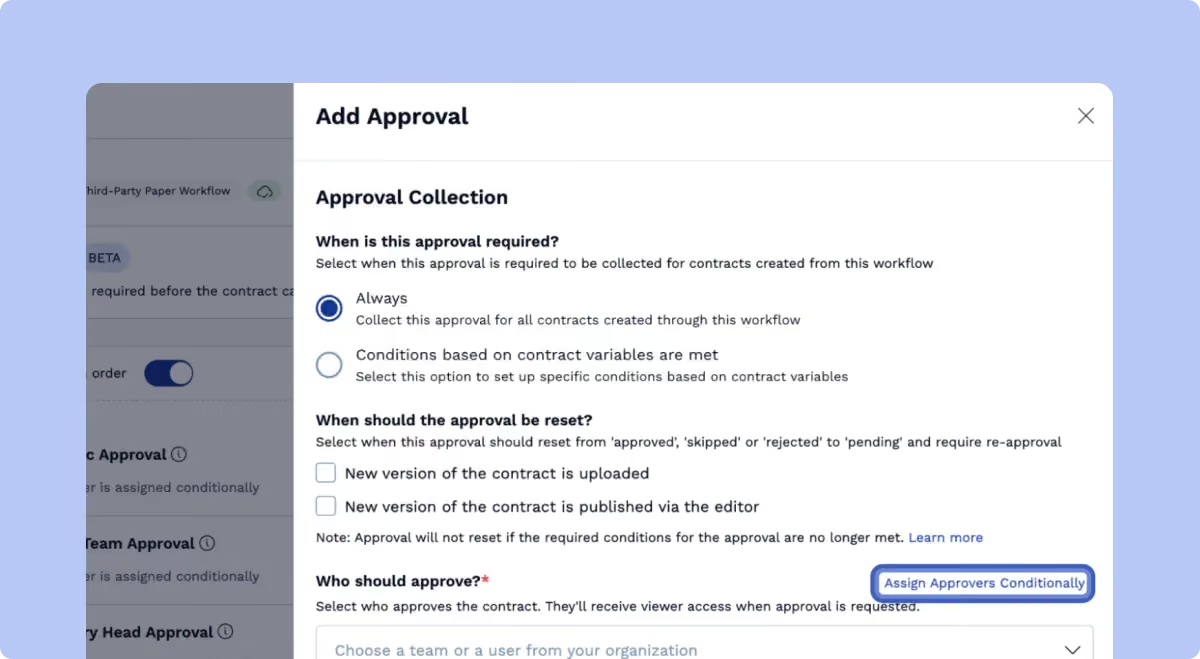
The SpotDraft Contract Editor supports drafting, redlining, comments, and collaboration while keeping Microsoft Word available for teams and counterparties that work there.
A representative counterparty agreement is a useful test. Run it through several rounds of edits and compare how versions, comments, and formatting remain connected to the contract record.
The SpotDraft Contract Repository centralizes agreements and supports full-text search, metadata filters, related contracts, saved views, and recurring reporting.
For a team already evaluating LinkSquares Analyze, repository testing should use real legacy agreements. Search for a specific clause, identify an expiring agreement, and build a view another department can use. That gives a clearer picture of day-to-day functionality than a standard product walkthrough.
SpotDraft Contract Analytics provides more than 30 metrics across the entire lifecycle, including creation, approvals, review, and turnaround data.
That gives Legal more visibility into where contract work is spending time and how workload changes as volume grows.
For teams comparing a repository-focused contract intelligence platform with broader contract lifecycle management, these process metrics are worth including in the evaluation alongside clause and portfolio data.

SpotDraft Sign keeps execution connected to the same contract-management workflow.
LinkSquares also provides its own signing functionality, so the comparison should include the commercial terms as well as the workflow. LinkSquares gives Finalize users 10 Signature Requests before additional requests need to be purchased.
For SpotDraft, confirm the signing scope included in the written proposal alongside the rest of the platform requirements.
Together, these capabilities give teams a way to compare SpotDraft and LinkSquares across workflow, editing, execution, repository management, analytics, and implementation without relying on feature counts alone.