What Is CLM? Contract Lifecycle Management Software Guide

Huzaifa Sultana is a Marketing Associate at SpotDraft focusing on Organic Growth through SEO and AEO.
.avif)
Contract work often slows down at handoffs. A request arrives through Slack, the draft lives in Microsoft Word, approvals happen over email, signatures move into another tool, and the executed agreement ends up in a shared drive. When those handoffs are managed across separate tools, teams can spend more time locating documents, checking status, following up on approvals, and tracking deadlines.
Those recurring contract management challenges often lead legal and operations teams to ask what is CLM and how the process can be managed more consistently. A useful answer includes both the process and the software that supports it. Teams need a repeatable contract management process for every agreement, defined ownership at each stage of the contract lifecycle, usable contract data after signature, and enough visibility to see where work is slowing down.
This guide covers the CLM meaning, how CLM software works, the stages it manages, the work it automates, the teams that use it, and what to evaluate before investing in a platform.
Contract lifecycle management (CLM) is the structured process of managing a contract from the initial request through drafting, negotiation, approval, signature, storage, ongoing management, and renewal or expiry.
That is the simplest contract lifecycle management definition. The important part is the lifecycle: each agreement moves through several people, decisions, documents, and deadlines before and after signature. CLM gives those activities an organized process instead of leaving each team to manage its part independently.
A practical CLM definition also separates the process from the technology. CLM describes how the organization manages contracts. A contract lifecycle management system provides the technology used to run, connect, and track that process.
This is also why the contract lifecycle management meaning goes beyond storing signed PDFs. Storage is one stage. Request intake, contract creation, collaboration, approvals, execution, contract data, renewals, and reporting belong to the same lifecycle.
Contract management and CLM are closely related terms, and vendors sometimes use them differently. SpotDraft's guide to what contract management means goes deeper into the broader discipline and where lifecycle management fits.

CLM software is a digital platform that connects the people, documents, workflows, contract data, and deadlines involved across the contract lifecycle.
When buyers ask what is CLM software, they are usually comparing it with the tools already holding individual pieces of the process: Word for drafting, email for approvals, an eSignature product for execution, shared drives for storage, and spreadsheets for renewals.
CLM software connects those activities through a CLM process so information follows the contract from one stage to the next.
That is the practical CLM software meaning: it keeps the entire contract process connected so contract status, history, data, and ownership can move with the agreement.
SpotDraft brings contract creation, collaboration, workflows, eSignatures, repository management, reporting, analytics, integrations, and legal intake into the same product ecosystem.

CLM covers the complete contract lifecycle, while contract management can refer either to the broader discipline of managing agreements or, in narrower usage, to post-signature contract administration such as storage, reporting, obligations, and renewals.
So, the practical answer to what is CLM vs. contract management comes down to scope. CLM explicitly follows the agreement through its lifecycle. A contract management tool focused mainly on storing and finding executed agreements handles an important part of that process, while a full CLM connects the work that happens before signature as well.
Terminology varies across the category, so product labels tell you less than workflow coverage. During evaluation, check whether the platform handles your actual path from request through post-signature management instead of assuming every product described as “contract management” offers the same capabilities.
The seven stages of contract lifecycle management are request, authoring, negotiation, approval, signing, storage, and renewal or expiry. Real contracts often loop back during negotiation or approval, but these stages give teams a practical way to map the lifecycle.
SpotDraft has a deeper breakdown of the seven stages of the contract lifecycle. Here is what happens at each phase of the contract lifecycle and where CLM software fits.
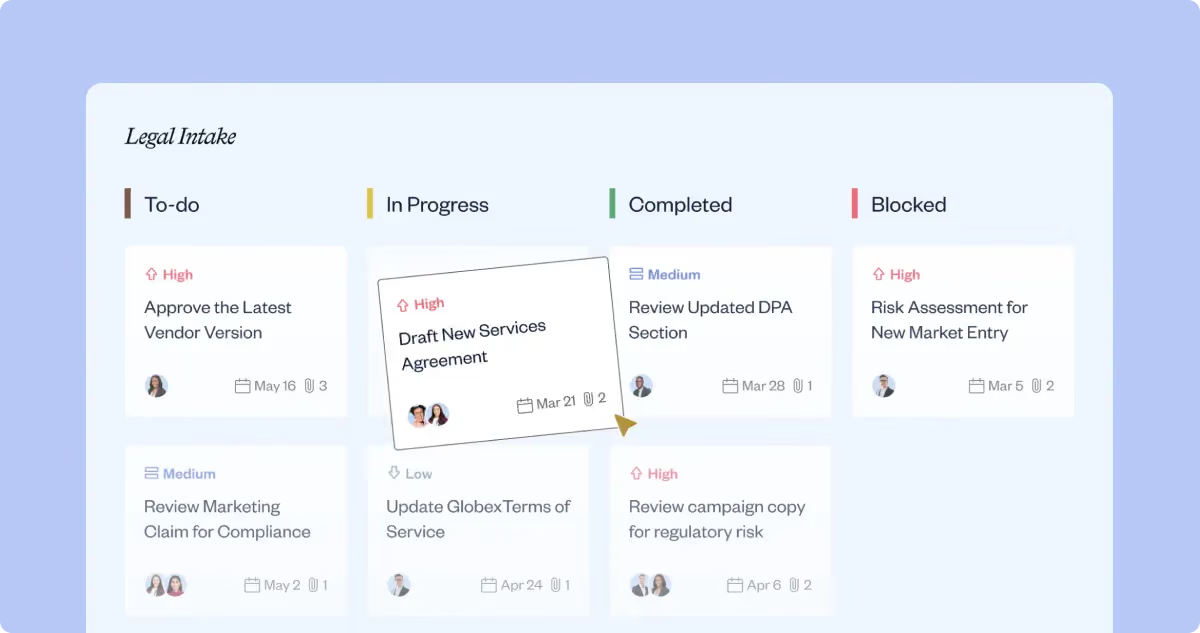
Contract requests start when someone needs a new contract, amendment, review, or another legal action. A structured intake process collects the information Legal needs upfront, assigns ownership, and lets the requester follow progress without chasing someone over Slack or email.
SpotDraft Legal Intake captures, prioritizes, assigns, and tracks legal requests in one queue. Requests can come through structured forms or Slack, and business teams can follow progress without repeatedly asking Legal for an update.
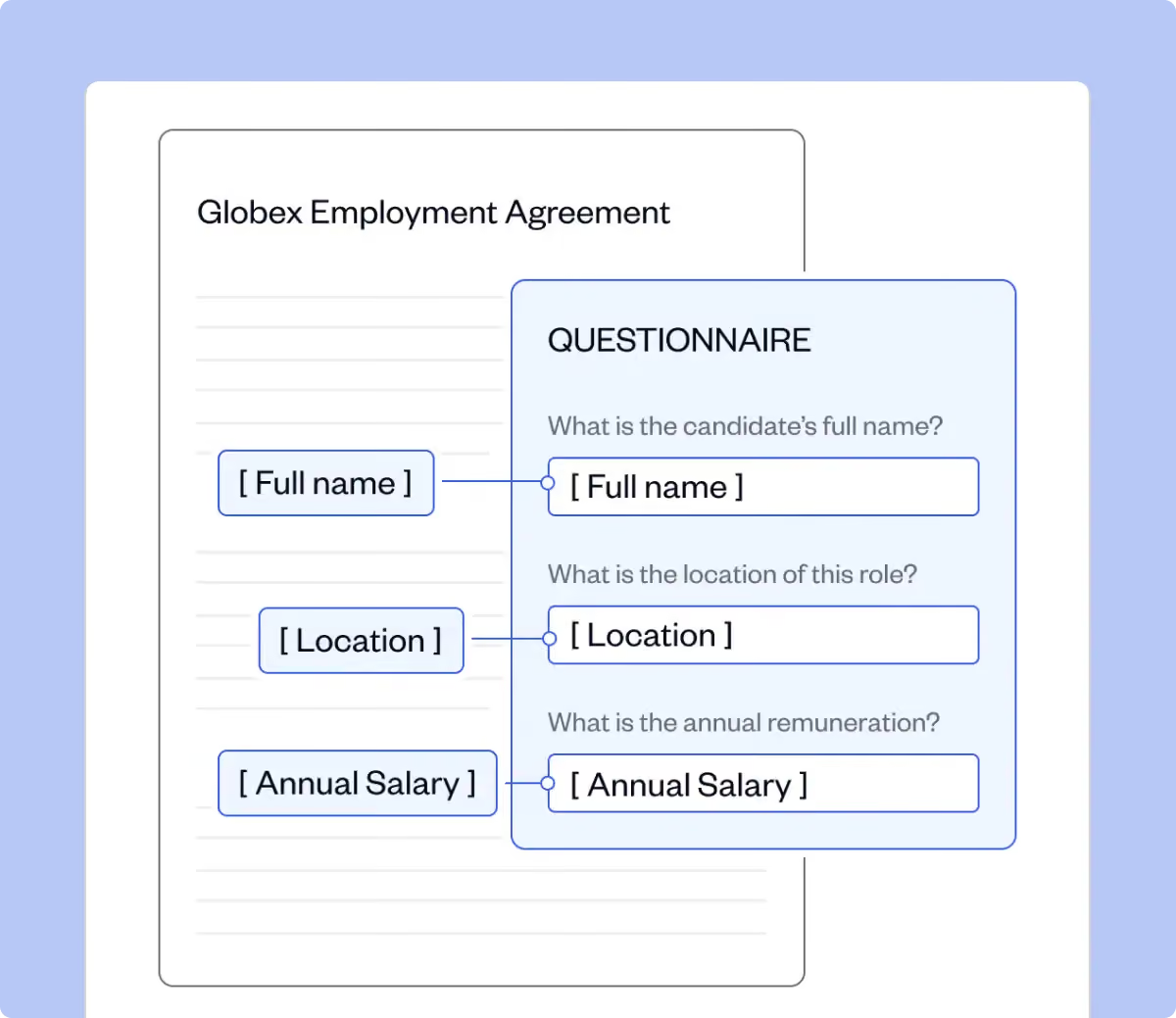
Contract authoring turns the request into an agreement. For standard agreements, Legal can maintain a contract template library with approved variables, clause libraries, standard terms, and internal policies while exceptions move to the appropriate reviewer.
SpotDraft Templates use questionnaires and conditional logic to populate agreements and route them through configured approval workflows. Business teams can create repeatable contracts while Legal continues to control the underlying template and process.
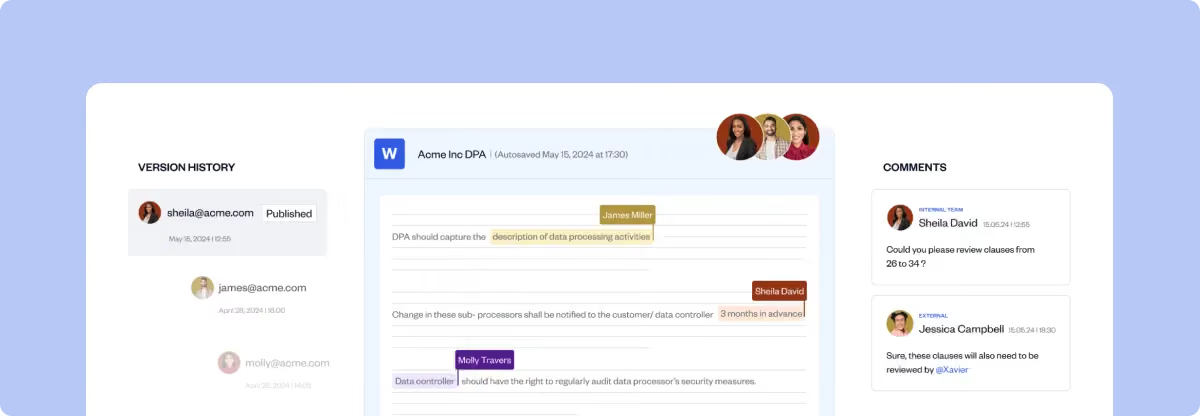
Contract negotiation and review introduce redlines, comments, counterparty changes, internal discussions, and multiple document versions. CLM software keeps the review process connected with the agreement so teams can see the current document and how it changed.
SpotDraft's Contract Editor supports editing, redlining, comments, version history, Microsoft Word workflows, and collaboration in real time.
Approval determines who needs to sign off before the agreement moves to execution. The route can change with contract value, agreement type, jurisdiction, payment terms, or another business rule, which makes long email chains increasingly difficult to manage.
A defined contract approval workflow routes agreements according to those rules and records where each approval stands.
SpotDraft Workflows lets teams configure contract creation, review, and approval processes without technical setup. Rules can automatically route the contract to the appropriate stakeholder based on the conditions Legal has defined.
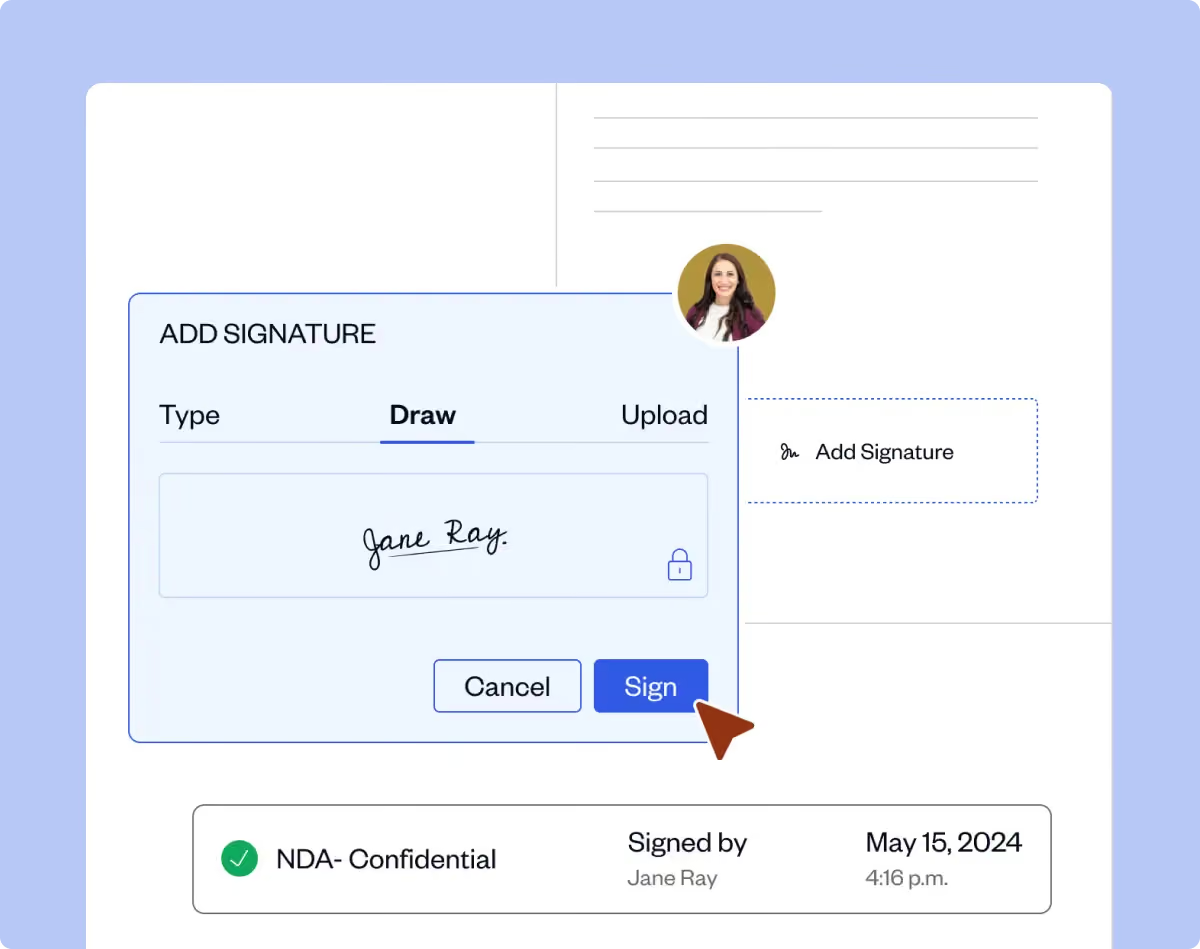
Once the agreement is finalized and approved, document signing moves it into execution. Keeping signature status connected with the contract record removes another system handoff and makes it easier to keep the final agreement with its history.
SpotDraft Sign sits inside the CLM and supports signing workflows, real-time status tracking, reminders, audit history, and automatic storage of signed agreements in the SpotDraft Repository.
Teams evaluating this stage should also understand the difference between contract management and eSignature software. An eSignature product handles execution; CLM handles the stages around it too.
Executed contracts need to become usable information for compliance tracking, obligation management, reporting, and renewal decisions instead of files that disappear into folders. A contract repository organizes agreements, supports full-text and metadata search, connects related documents, and controls access to sensitive information.
SpotDraft Repository supports full-text search, metadata filters, saved views, related-contract linking, and recurring reporting. Its AI supports data extraction across more than 1,000 types of contract metadata.
The broader goal of a contract repository is to make the executed agreement usable throughout its remaining lifecycle instead of treating signature as the end of the process.
Contract obligations and key terms can include renewal windows, termination rights, notice periods, service delivery commitments, commercial commitments, and expiration dates. These contractual obligations need owners and enough lead time for the business to decide what happens next.
CLM reporting turns those dates and fields into searchable views and recurring reports. SpotDraft Reporting supports custom views and reports that automatically update as relevant contracts are added, including reports based on expiry dates and other metadata. For agreements with measurable service levels, the same data can also support contract performance monitoring.
The same lifecycle data also feeds process analytics, helping teams see contract volume, approval timing, review activity, and turnaround time instead of relying on individual updates.
See how your own contract moves through all seven stages.
CLM software automates routine tasks such as intake, routing, template population, status tracking, reminders, data capture, and reporting. Legal professionals and business team members continue to own judgment, negotiation strategy, approvals, exceptions, and policy decisions.
That boundary is useful when assessing what is CLM automation. The goal is to reduce manual effort around administrative work while preserving legal judgment so experienced people can spend more time on agreements and decisions that genuinely need them.
The starting point for effective contract management automation is a defined workflow. Automating an unclear workflow can reproduce the same ambiguity inside a new system.

Companies use CLM software to shorten contract cycles, reduce repetitive administrative work, improve operational efficiency, standardize routine contracting, and make agreements easier to manage after execution.
The practical benefits show up at handoffs that previously needed manual follow-up:
The broader benefits of contract management software become easier to evaluate when they are tied to measurable workflow changes instead of a list of product features.
SpotDraft customer results offer examples of what that looks like in specific implementations. Wingify reports that 75% of its contracts are now created directly from Salesforce and that contract cycle time fell by 65%. Open reports a 90% reduction in contract approval turnaround time and a 65% reduction in errors or discrepancies in contract terms. Gameskraft reports a 70–75% increase in contract lifecycle management efficiency and more than 10 hours saved each week.
Those are customer-specific results, so they should be read as examples of what each team achieved with its own workflows and implementation.
Bring the bottleneck you want to fix and see how it would work in SpotDraft.
CLM software should cover the workflow before signature, execution itself, post-signature management, and the data required to improve the process over time.
The exact feature set varies by team, but these capabilities provide a useful baseline:
When comparing the best CLM software, look at how these features work together. A template that does not feed an approval process, a repository without lifecycle context, or an integration that simply copies files still leaves manual handoffs.
SpotDraft's Salesforce workflow is a useful example of looking beyond an integration logo. Sales teams can create, track, and manage contracts from Salesforce, while Wingify's implementation uses Salesforce for contract generation, status tracking, data population, eSigning, and two-way synchronization.
See how SpotDraft fits into the tools your teams already use.
CLM supports business processes that require Legal and other departments to request, review, approve, sign, pay against, buy through, or operate under agreements.
That makes the answer to what is CLM used for different across teams:
Legal usually defines templates, process rules, permissions, and escalation paths, while business teams interact with the parts of the workflow relevant to their work.
That is why effective contract lifecycle management best practices focus on ownership, governance, adoption, and process design alongside software configuration.
A CLM tool becomes worth evaluating when manual contract management creates repeated handoffs, delays, or visibility problems that email, shared drives, spreadsheets, and individual point tools no longer support reliably.
There is no universal company-size threshold. Contract volume, workflow complexity, number of stakeholders, and recurring bottlenecks are more useful signals.
A small legal team handling frequent, cross-functional contract work can have a more urgent CLM need than a larger organization with relatively low agreement volume. Start with the recurring bottleneck and its operational cost, then work backward to the workflow required to solve it.

After identifying those signals, the next step is to establish which ones cost the team the most time or create the most business friction.
Map your current contract workflow with SpotDraft.
For teams evaluating CLM platforms in 2026, the scope includes workflow automation, searchable contract data, analytics, business-system integrations, and AI-supported contract work across the lifecycle.
A current CLM evaluation should look beyond post-signature storage and assess how contract information supports work from intake through renewal. Intake information feeds creation, workflow events create process metrics, executed agreements become searchable data, and those records support renewal and portfolio reporting.
AI expands the amount of contract information software can process, but teams still need appropriate review and governance around important outputs. That distinction is useful when evaluating AI contract management software because an AI feature is more useful when it improves a real stage of the contract workflow.
SpotDraft's Repository, for example, supports AI-based extraction of more than 1,000 metadata properties alongside full-text search, saved views, filters, and related-contract linking. Its Contract Analytics product separately provides more than 30 metrics across lifecycle, approval, review, and turnaround reporting.
The current evaluation is broader than contract storage: how well does the system connect the work and data around an agreement from the first request through everything that happens after signature?
Choose CLM software by starting with the contract problems you need to fix, then test whether the platform can handle those workflows with your actual contracts, systems, people, and data.
A useful evaluation looks like this:
Do not run the evaluation against a polished vendor sample alone. Bring your own NDA, MSA, third-party agreement, approval route, historical contracts, and one or two important integrations into the demo or proof of concept. That exposes workflow gaps while you still have the opportunity to compare alternatives.
Implementation deserves the same attention as functionality. SpotDraft's CLM implementation guide identifies migration, integrations, workflow configuration, and adoption as major timeline inputs.
SpotDraft's current pricing page says pricing is based on either users or contract volume and that its in-house team handles workflow and integration setup plus legacy-contract migration without extra implementation fees.
Once you have a shortlist, compare the complete commercial setup using the CLM software pricing guide instead of looking at subscription figures in isolation.
Test SpotDraft with your own contracts, workflows, and integrations.
Measure CLM ROI by comparing time savings, cost savings, and business outcomes before and after implementation.
The useful metrics are the ones connected to the business goals behind the investment. A legal team trying to fix approvals should track approval turnaround time. A team trying to give Sales more autonomy should watch self-service contract creation and status requests. A team struggling with renewals should measure renewal visibility and the time required to prepare for upcoming decisions.
SpotDraft Contract Analytics provides dashboards covering lifecycle, approval, review, and turnaround data, with more than 30 contracting metrics available across the product.

SpotDraft's contract management ROI framework goes deeper into building the business case. Establishing the baseline before implementation is important because the improvement has to be measured against how the team actually worked before the CLM went live.
SpotDraft connects intake, contract creation, collaboration, workflows, eSignatures, storage, contract data, reporting, analytics, and integrations across the contract lifecycle.
A request can enter through Legal Intake, standard agreements can start from approved templates, contracts can move through configured approval rules, signatures can be collected inside the same platform, and the executed agreement can remain available through the repository for search and reporting.
The workflow also extends into tools used by business teams. Wingify, for example, reports that 75% of its contracts are generated through Salesforce and that its contract cycle time fell by 65% after implementing SpotDraft's Salesforce integration.
That is the useful way to evaluate the platform: take the contract workflow your team already runs and see how many handoffs, status checks, duplicate entries, and disconnected tools remain once it is configured inside the CLM.