CLM vs CRM: What's the difference and why does your business need both?

Huzaifa Sultana is a Marketing Associate at SpotDraft focusing on Organic Growth through SEO and AEO.
A sales opportunity might begin in Salesforce, HubSpot, or Zoho CRM. Sales uses the customer record to track conversations, deal value, and commercial requirements. But once the customer is ready to sign, someone still needs to prepare the agreement, check its terms, collect approvals, negotiate changes, and arrange signatures.
These activities involve different information and responsibilities. Sales needs visibility into the opportunity, while Legal needs control over the contract.
That's the distinction behind CLM vs. CRM. Customer relationship management (CRM) software manages customer relationships and sales activity. Contract lifecycle management (CLM) software manages agreements from creation through negotiation, execution, and post-signature administration.
The systems also need to exchange customer data and contract updates. Otherwise, employees repeatedly enter account details, request contract status through email, and update deal records manually after signing.
This guide compares CLM and CRM, explains when businesses need both, and examines how integrated workflows connect Sales and Legal without removing contractual controls.
Connect your customer records with Legal-approved contract workflows in SpotDraft.
CLM and CRM support different business operations. Both store information used during customer transactions, but each organizes that information around a different process.
To understand the CLM vs CRM distinction, start with the information each system manages and the work that takes place around those records.
Contract lifecycle management is the process of creating, reviewing, approving, executing, storing, and managing agreements throughout their lifecycle.
A CLM solution connects these activities through a shared contract record. Legal teams configure templates and approval requirements, business teams submit requests, reviewers collaborate on proposed terms, and authorized signatories execute the final agreement.
After signing, the same contract remains available for reference, reporting, renewal tracking, and obligation management.
For example, a master service agreement (MSA) might require Legal approval for liability terms and Finance approval for a nonstandard payment schedule. The CLM workflow records the agreement, relevant reviewers, negotiated versions, and approval history.
Once signed, the agreement becomes part of the organization's contract repository, where users with the appropriate permissions access its terms and related documents.
Learn more about the stages involved in contract lifecycle management.
Customer relationship management uses software and processes to track prospects, manage customer engagement, record interactions, and organize commercial opportunities.
CRM systems help Sales move opportunities through the sales cycle, record customer communication, manage accounts, and coordinate follow-up activities.
For example, a Salesforce opportunity might contain the customer's legal name, proposed subscription value, products being purchased, commercial terms, expected close date, and account owner.
That information supports the sales process, but the opportunity record does not by itself establish whether Legal approved a requested indemnification clause or which version of an MSA the counterparty signed.
This distinction in CLM vs CRM is important when defining where deal information ends and formal contract management begins.
CRM manages customer relationships and sales opportunities. CLM manages the agreements, terms, reviews, approvals, and obligations connected with those relationships.
In a CLM vs CRM comparison, the primary distinction is the object each platform manages. A CRM organizes activity around accounts and opportunities, whereas a CLM organizes activity around contracts.
The following table compares how those responsibilities translate into records, users, workflows, and post-signature activities.
The difference becomes apparent when a customer requests a change to an agreement.
Sales records the proposed commercial terms in the CRM. Legal reviews whether the requested change is permitted under the organization's contract policies. If the change requires additional approval, the CLM routes the agreement to the responsible stakeholder.
A CRM approval for a discount and a CLM approval for a limitation of liability clause therefore address different decisions, even when both relate to the same transaction.
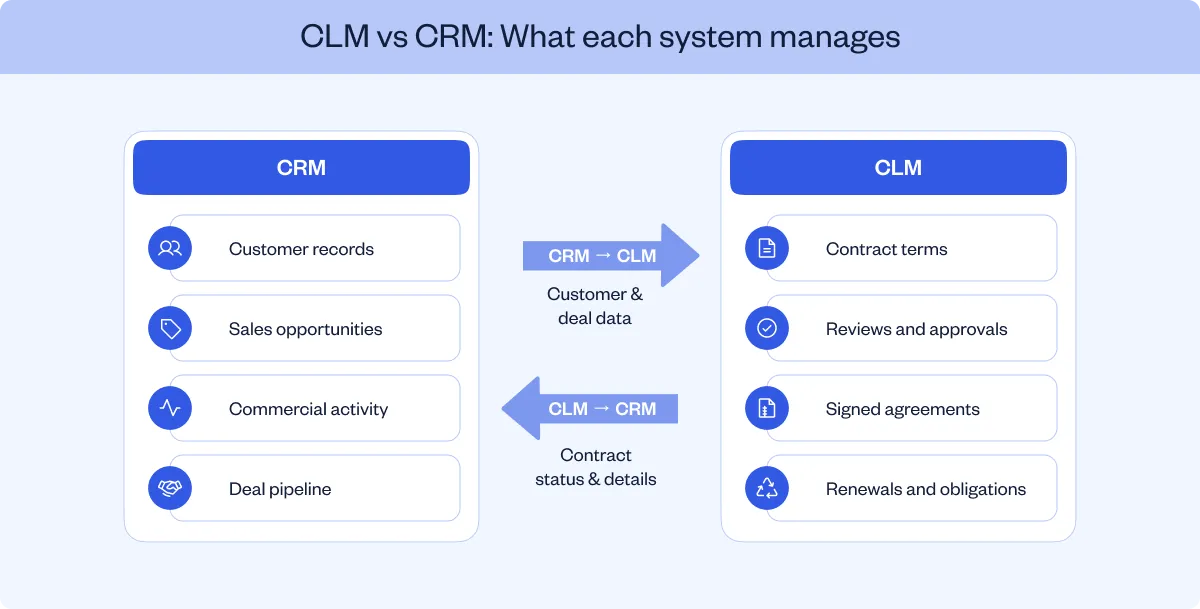
Businesses need CRM for customer and sales activity, CLM for structured contracting, and both when the sales process regularly involves creating, negotiating, and managing agreements.
The CLM vs CRM decision becomes easier when it is based on the work employees need to complete. The table below identifies which system is responsible for common business requirements.
The requirements fall into three situations: customer management alone, structured contract management, or a connected process involving both.
A CRM solution is the appropriate starting point when the main requirements involve managing prospects, tracking sales activity, and maintaining customer records.
For example, a small sales team working with straightforward transactions might use CRM capabilities and an electronic signature tool without introducing a separate CLM platform.
That arrangement needs reassessment when employees regularly negotiate third-party agreements, use several contract templates, or manage contractual approvals beyond ordinary sales authorization.
CLM addresses contract-specific requirements that need structured processes and records.
A business handling NDAs, MSAs, supplier agreements, and statements of work should evaluate approved templates, version control, conditional approvals, negotiated clause histories, and centralized storage.
Legal also needs to control who creates agreements, which clauses employees can change, and when nonstandard terms require escalation.
For sales contracts requiring Legal review, a dedicated CLM establishes a managed approval process rather than relying on email exchanges and separately maintained document folders.
Organizations need CLM and CRM together when customer and contract workflows are connected.
For example, Sales needs an agreement generated using opportunity data, Legal needs to review nonstandard terms, and the account team needs to know when execution is complete.
Using CRM and CLM together allows organizations to define which records belong in each system and how relevant information passes between them.
In this situation, the CLM vs CRM decision shifts from choosing one platform to establishing how both systems support the transaction without duplicating work.
Have Salesforce opportunities that require Legal-approved contracts and conditional approvals?
CLM and CRM work together by transferring approved customer and deal information into the contracting process, then making relevant contract updates available to Sales.
The CLM vs CRM distinction becomes practical when the two systems participate in the same transaction.
Consider a company selling enterprise software through Salesforce. A prospective customer has agreed to the commercial proposal, and the account executive needs an MSA.
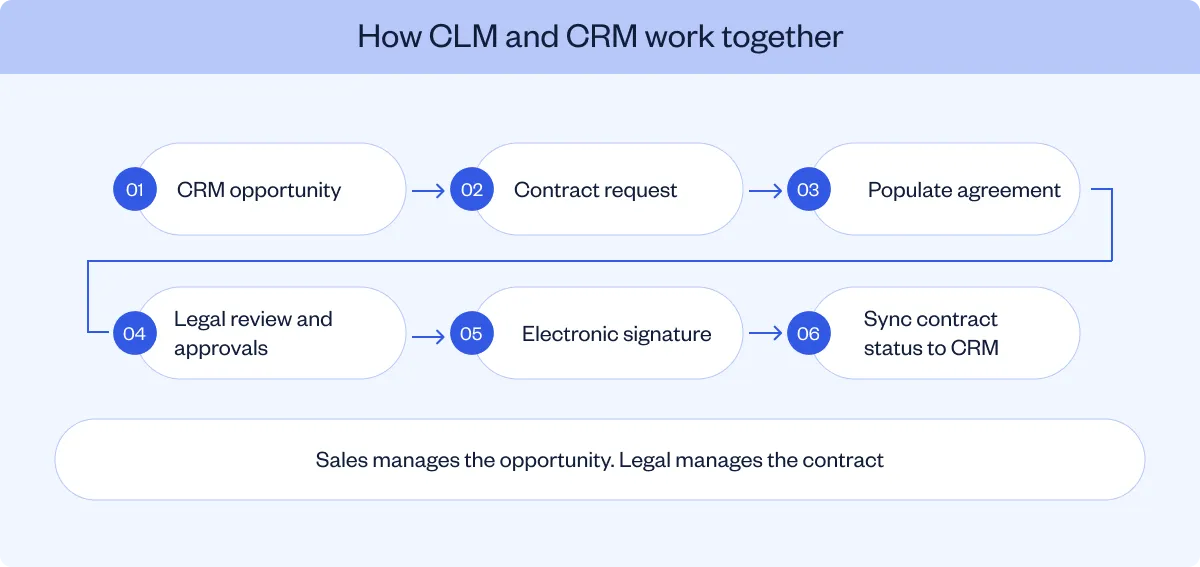
The connected workflow proceeds as follows.
The opportunity contains customer information, proposed contract value, relevant products, and the account owner.
Before an agreement is generated, the organization establishes which CRM fields should populate the contract and which values require review.
Instead of preparing a separate request by email, sales reps select the appropriate agreement through the connected CRM–CLM workflow.
The CLM uses the selected Legal-approved template and the information mapped from the opportunity.
The customer's legal name, commercial details, and other configured fields populate the relevant contract questionnaire or template.
Field mapping establishes the relationship between the CRM record and contract fields. If the customer's billing entity differs from the account name, the workflow should use the correct legal entity rather than automatically substituting the account's display name.
The CLM follows the configured contract process, including drafting, review, and approval steps.
For example, an MSA with a nonstandard limitation of liability clause might require Legal approval, while a discount beyond an approved threshold might require Finance authorization.
Sales retains responsibility for the opportunity, while Legal manages the contractual review.
Following the required approvals, the agreement is sent to authorized signatories.
The CLM records the execution process and stores the completed agreement with the relevant contract history.
Configured synchronization updates the associated CRM record with relevant information, such as the contract status, execution date, or signed document.
The exact information synchronized and the event that triggers the update depend on the integration's configuration.
For Sales, this means the opportunity record can reflect contracting progress without the account executive maintaining a separate status spreadsheet.
CRM is one part of a broader CLM integration setup. Contracts also move through procurement, document storage, and other business systems, with supported actions and data flows varying by integration.

Integrating CLM and CRM connects the information Sales already maintains with the contract workflows Legal needs to control. The operational benefits follow from specific changes to data entry, collaboration, status tracking, and post-signature records.
For businesses comparing CLM vs CRM, these benefits show how the two systems work together once their responsibilities have been defined.
Without an integration, employees often copy customer names, company details, commercial values, and contract dates from CRM into agreement templates.
Field mapping allows those values to populate designated contract fields.
For example, an order form can use the account's legal entity, the approved subscription amount, and selected product details from CRM. Employees then review the generated agreement instead of re-entering each value.
Employees spend less time on administrative work such as re-entering customer details in mapped fields, but they still need to validate missing or inconsistent source data.
Sales and Legal do not need to manage every contract request through email.
A configured workflow gives Sales a way to initiate approved agreement types while Legal establishes templates, review requirements, and approval conditions.
Routine agreements follow those requirements. Contracts containing nonstandard terms are routed to the appropriate reviewers.
This is particularly relevant to contract management for sales teams, where employees work primarily within CRM but still need Legal oversight.
The account executive needs to know whether an agreement is in drafting, review, negotiation, or signature.
When the integration exposes these details in CRM, Sales has access to the current contract stage and outstanding actions without repeatedly requesting updates.
The value comes from making workflow information available at the point where the account team manages the opportunity.
For this to work, buyers should verify whether CRM status updates appear in real time or only after configured synchronization events, and how failed updates are handled.
CRM–CLM integration allows contract requests to enter a process governed by Legal.
The organization can restrict template availability, define contract creation conditions, and require particular approvals based on the agreement or associated commercial information.
For example, an agreement above a contract-value threshold could follow an approval route involving Finance before signing.
The process is governed through contract management automation, while the CRM supplies relevant deal context.
After execution, the account team might need the signed agreement, execution date, contract term, or renewal information to support account management and customer retention activities.
A configured integration makes selected contract information available alongside the customer relationship record while the CLM retains the agreement's contractual history.
Data management rules should establish which system owns each field. Otherwise, a CRM opportunity and an executed agreement might contain different values without an established correction process.
The result is a connected sales-to-contract workflow with defined field ownership, rather than separate data silos for customer and contract information.
Want Sales to access contract status and approvals without maintaining separate tracking spreadsheets?
A CLM and CRM integration should support contract creation, field mapping, approvals, status visibility, execution, and the exchange of relevant contract data.
A connector between CLM and CRM applications such as Salesforce, HubSpot, or Zoho CRM is only the starting point. Buyers need to understand which actions the connection supports and what configuration is required.
The following criteria provide a practical basis for evaluating integration capabilities during a CLM vs CRM software comparison.
These capabilities need to be verified in the intended implementation, particularly where contract data changes or the agreement does not follow a standard template.
The main technical consideration is not simply whether data moves between systems, but which system owns the information and what causes an update.
For example, a CRM opportunity might contain an initial contract value of $120,000. During negotiations, the parties agree to $110,000.
The final executed agreement records the accepted amount. If CRM continues to display the original value, Sales and Finance are working with inconsistent information.
The integration design should establish whether the final contract value updates CRM, what event triggers the update, and which users are permitted to change the relevant field.
These rules form part of a broader CRM contract management process.
A standard template demonstration does not establish how the integration handles customer-supplied agreements, missing fields, revised pricing, or contracts initiated outside CRM.
For example, a customer might send an MSA that requires third-party paper review instead of a Legal-approved template. The workflow still needs to associate that agreement with the correct account or opportunity.
Before implementation, buyers should test the required contract types, CRM objects, field mappings, review routes, and signing events.
They should also confirm the CRM setup requirements, whether the integration is native, API-based, or implemented through an additional connector, and any associated licensing or services.
The same evaluation applies to other CLM integrations used across contracting, including procurement, document storage, and electronic signatures.
The main CLM–CRM integration challenges involve inconsistent source data, incorrect field mapping, incomplete workflows, permissions, and outdated status information.
These issues arise when two systems manage related information but the organization has not defined how records should be created, updated, and used.
A CLM vs CRM integration assessment should therefore cover the technical and operational issues below before deployment.
These challenges are connected, but each requires a specific configuration or ownership decision. To evaluate user adoption, check whether Sales and Legal complete routine agreements through the integrated workflow rather than email.
A CRM and CLM can both contain a customer name, contract value, or date. That does not mean every field should be editable in both systems.
Define which record supplies the initial value, which system holds the authoritative contractual value after execution, and how differences are resolved.
For example, the opportunity might supply the proposed commercial amount, while the executed agreement establishes the final contracted amount.
A sales employee authorized to create an agreement should not automatically receive permission to approve nonstandard clauses or modify Legal-controlled templates.
The integration should preserve contract approval permissions even when Sales handles opportunity management inside CRM.
This becomes particularly important when introducing additional contract types or extending contract approval workflows across departments.
Integration testing should include a complete contract, a revised agreement, a missing-field error, and a synchronization failure.
The implementation team should document who maintains field mappings, updates approval rules, troubleshoots failed transfers, and changes the integration when CRM objects or business processes change.
An integration implementation plan should assign these responsibilities before deployment and define CLM metrics, such as contract cycle times, alongside synchronization error rates for ongoing review.
Review CRM field mapping, permissions, and exception handling using a representative sales agreement.
SpotDraft integrates with Salesforce, HubSpot, and Zoho CRM so Sales can initiate contracts using existing customer records while Legal manages templates, approvals, and execution through SpotDraft.
The integrations support different CRM workflows, with contract creation, field mapping, and available synchronization features varying by platform.
SpotDraft's Salesforce integration connects contract creation and management with Salesforce Accounts, Opportunities, and supported custom objects.
The integration supports:
For example, Sales can generate an MSA from an Opportunity, follow Legal's review, and access execution updates. Reverse sync requires defined triggers, field mappings, and links between contract and CRM records.
SpotDraft's HubSpot integration allows Sales to create contracts from Deals using mapped information from Companies, Contacts, Quotes, and Line Items.
For example, an order form can use customer and commercial details already recorded in HubSpot. Sales can access supported approval, signature, and status functions while Legal manages the agreement in SpotDraft. Contract metadata and status synchronization follow the configured integration settings.
SpotDraft's Zoho CRM integration supports contract creation from Deals, Accounts, and Contacts.
Configurable buttons connect Zoho records to selected SpotDraft templates. Field mapping transfers customer information into contract questionnaires, while creation conditions determine available workflows.
For example, Sales can generate an NDA from a Zoho Deal without entering counterparty details again. Buyers should verify the supported synchronization fields and update behavior separately from Salesforce.
CRM integration does not replace contract approvals. SpotDraft Workflows applies Legal-approved templates, conditional routing, and reviewer permissions.
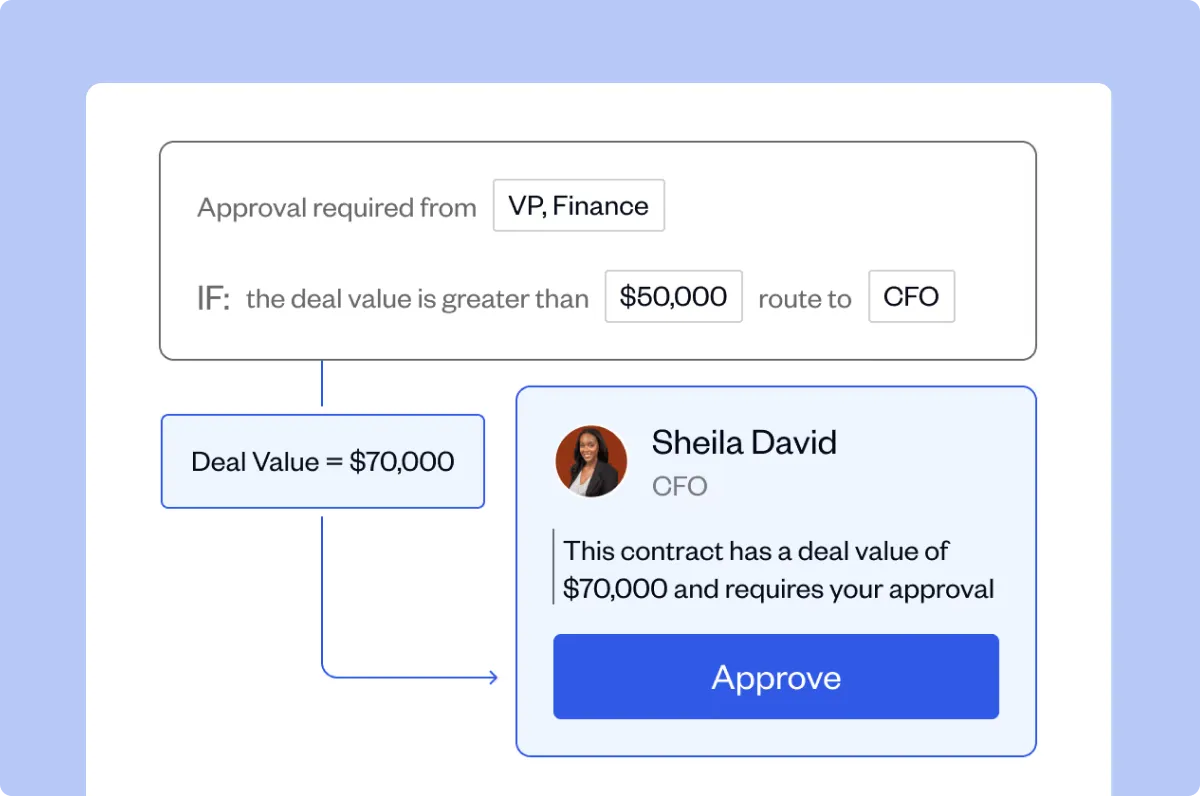
A standard NDA can follow an approved workflow, while a customer-provided MSA requires additional Legal review. SpotDraft Sign handles execution, and the Contract Repository stores completed agreements and related information.