AI contract lifecycle management: A complete guide

Huzaifa Sultana is a Marketing Associate at SpotDraft focusing on Organic Growth through SEO and AEO.

Legal teams manage contracts from the first request through drafting, negotiation, approvals, signing, and renewals. Each stage involves information that needs to reach the right people. When contract terms remain in documents, approvals happen through email, and renewal dates sit in spreadsheets, Legal spends time locating information and coordinating work. This manual effort increases as contract volume grows.
AI contract lifecycle management (AI CLM) helps address these problems by applying artificial intelligence to contract data and workflows. It supports tasks such as identifying clauses, comparing language against legal playbooks, extracting key terms, and finding information across executed agreements. Combined with workflow automation, these capabilities help teams manage contract work from creation through post-signature administration.
The distinction is important. Contract intelligence uses AI to interpret agreement language and extract information, while workflow rules control how agreements move between people and systems. Legal teams still determine which terms are acceptable, which exceptions require escalation, and who approves the final agreement.
This guide explains how AI CLM works across the contract lifecycle, where it supports Legal and business teams, how to implement it, and what to evaluate before selecting a platform.
AI contract lifecycle management is the application of artificial intelligence to the processes and information involved in creating, reviewing, approving, executing, and managing contracts.
AI CLM software uses natural language processing (NLP), machine learning, and large language models (LLMs), including generative AI models, to analyze contractual language, extract information, and suggest text. It operates alongside contract management capabilities such as templates, approval workflows, electronic signatures, repositories, and reporting.
For example, a legal team reviewing a supplier agreement can use AI to identify a limitation of liability clause, compare it with an approved legal position, and prepare suggested changes. Once the review is complete, the CLM workflow routes the agreement for the required approvals and signature.
That illustrates the practical AI CLM meaning: AI supports work involving contract language and information, while the surrounding lifecycle remains governed by defined workflows, permissions, and human decisions.
Traditional contract lifecycle management uses templates, workflow rules, document storage, permissions, and reporting to manage agreements. AI CLM builds on those functions by adding capabilities that interpret and generate information from contracts.
The following table compares conventional CLM functionality with AI-enabled capabilities.
These capabilities vary by vendor and product. Traditional CLM systems already provide workflow automation without using AI. Likewise, adding an AI assistant to a repository does not automatically extend AI across every stage of the contract lifecycle.
For a broader explanation of the underlying process, see what contract lifecycle management is and how the contract management workflow connects drafting, negotiation, approvals, execution, and renewals.
AI contract review is one use case within AI contract lifecycle management, not a replacement for the full CLM process.
An AI contract review tool analyzes an agreement against instructions, review guidelines, or approved legal positions. It identifies relevant language, flags deviations, and prepares suggestions that a reviewer accepts, rejects, or modifies.
AI CLM extends beyond this review process. It also supports contract intake, creation, structured data extraction, repository analysis, obligation visibility, and lifecycle reporting.
For instance, reviewing an indemnification clause addresses a specific negotiation task. Extracting the approved indemnification terms after execution and making them searchable across the portfolio addresses ongoing contract management.
The distinction helps buyers determine whether they need a dedicated AI contract review tool or a platform that also manages the surrounding agreement workflows and records.
AI CLM addresses repetitive contract work, fragmented information, limited access to agreement terms, and administrative tasks that require Legal's involvement.
These problems often develop as contract volume increases. Sales sends agreements for review through email, Procurement tracks supplier renewal dates in spreadsheets, and Legal repeatedly extracts contract details for different business units.
AI-powered CLM connects contract analysis with the systems and workflows that manage these activities. The benefits depend on the functions implemented and the quality of the underlying contract data.
The table below connects common operational problems with relevant AI capabilities.
These use cases address different stages of the same process. For example, extracting a renewal date is useful only when someone verifies it, records the responsible contract owner, and establishes the required follow-up.
That is why contract management automation should connect information extraction with defined business processes. AI provides the information, while the workflow determines what happens next.
See how SpotDraft connects AI-powered data extraction and legal knowledge queries with contract creation, approvals, and reporting.
AI helps classify requests, identify missing details, and guide employees into the right contract workflow. If Sales requests an NDA without the counterparty's legal name, the system can ask for that information before drafting begins. An approved template then creates the agreement using Legal's rules.
The functions remain distinct:
Legal controls templates, permissions, and exceptions so business teams can use approved language for contract drafting rather than start each routine agreement from scratch.
AI supports risk detection by locating clauses and comparing them with Legal-approved playbooks. For example, a supplier contract might contain unlimited liability when the company's position caps liability at fees paid during the previous 12 months. AI flags the deviation and proposes alternative wording; a lawyer assesses the risk level and decides whether the revision suits the transaction.
During contract negotiation, AI summarizes counterparty edits and suggests redlines. Test the same agreement against your playbook, checking clause references, explanations, tracked changes, and formatting. This shows whether the recommendations are usable within the review process.
AI identifies contract values or policy exceptions relevant to approval requirements. An agreement above $100,000, for example, might require Finance approval; an unusual liability clause might require Legal review. Routing remains rule-based automation: AI identifies information, while configured workflows determine approvers.
During testing, change the deal terms after approval routing begins. For example, increase the contract value and check whether the workflow adds the required reviewers.
Before signing, AI summarizes key terms for reviewers. Electronic signature software supports contract execution by managing signers, execution records, and completion tracking. Verify that revisions receive the necessary approvals and that the executed version is stored.
AI extracts structured information from historical and newly signed agreements, helping teams find key dates and other contract details without relying on filenames. Relevant fields include:
Review extracted fields before using them for compliance checks, reminders, or reporting. A contract might renew automatically unless notice is provided 60 days before expiry; recording the expiry date alone would miss the required action. AI contract analysis should account for connected clauses.
Natural-language search also lets authorized employees ask which agreements contain particular provisions or have upcoming renewal notices.

AI-driven CLM identifies renewal clauses, notice periods, and other contract obligations in executed agreements. For example, an annual supplier price review requires both a deadline and a responsible employee. After AI suggests the terms, the organization must verify them, assign ownership, and schedule follow-up.
Contract management reporting tracks key metrics such as drafting time, approval duration, contract volumes, and execution status. Together, verified contract terms and workflow metrics help Legal Operations manage obligations and assess performance.
Want to evaluate AI across pre-signature and post-signature work? Use a representative contract to test review, approvals, signing, extraction, and reporting.
No. AI CLM supports contract analysis and defined administrative tasks, but legal judgment, negotiation decisions, and accountability remain with people.
An AI system can identify language that differs from a playbook and prepare a suggested revision. The system cannot independently determine whether accepting that difference serves the organization's commercial interests, legal obligations, or risk tolerance.
Consider an agreement in which a customer requests unlimited liability for certain data protection breaches. AI might identify the provision and compare it with the company's standard limitation of liability language.
A lawyer's risk assessment considers the transaction value, nature of the data, regulatory obligations, negotiated protections, and the company's risk position before a final decision.
Human review by legal professionals is particularly important for:
A human-in-the-loop process establishes when AI output is reviewed, who has authority to accept it, and how exceptions are documented.
For example, Legal might authorize the system to prepare first-pass redlines on standard NDAs but require a qualified reviewer to approve the changes before they are sent externally.
This approach is consistent with CLM best practices, where access permissions, workflow ownership, approval controls, and auditability form part of the operating process.
AI CLM solutions should connect contract analysis with the decisions and workflows that follow. Consider a supplier agreement containing unlimited liability. The AI should identify the clause, compare it with Legal's approved position, explain the deviation, and suggest a redline. The lawyer then reviews the proposed change before negotiation continues.
The platform also needs to preserve version history, route the revised agreement for approval, manage signing, and store the executed contract with searchable metadata. AI identifies contractual information, while configured workflows control approvals and authorization.
Security extends to AI-generated answers. Contract permissions must restrict access to confidential agreements, and the vendor's data processing and model-training policies need to be documented.
Integrations connect this process with existing systems. For example, SpotDraft's Salesforce integration supports contract generation using CRM records and synchronization of contract information.
Finally, SpotDraft Contract Analytics reports workflow performance data, including review and approval times. Extraction accuracy and reviewer corrections provide separate measures of AI performance.
AI CLM implementation should begin with one recurring contract process, such as NDAs or vendor agreements. This gives Legal Operations an opportunity to test AI outputs, approval rules, and integrations using actual contracts before extending the system to other teams. The rollout follows seven steps:
Choose a recurring process, such as NDAs or vendor agreements. Map the steps from request to execution, identify manual tasks and delays, and record current cycle times as a baseline.
Collect relevant agreements, approved templates, playbooks, and policies. Check migrated contracts for duplicates, missing metadata, and other data quality issues. Document preferred clauses, fallback positions, and escalation rules for AI-assisted reviews.
Establish which tasks AI performs and which require human review. Assign responsibility for validating extracted data, approving suggested redlines, managing access permissions, and escalating contractual exceptions.
Set up templates, review guidelines, approval rules, signing steps, and repository fields. Test standard agreements and contracts containing nonstandard clauses. Correct extraction errors, unsuitable suggestions, and approval routing issues before launch.
Integrate the CRM, procurement, or document storage systems used in the selected workflow. Verify data synchronization, update permissions, and error handling to ensure contract information moves between systems as intended.
Train Legal administrators, reviewers, and business users on their responsibilities. Track contract turnaround, review duration, approval times, AI-output corrections, and adoption against the baseline to test whether teams spend less time on administrative work.
Once the initial workflow meets its requirements, extend the rollout to another contract type or department. Review the templates, playbooks, approvals, integrations, and permissions needed for each expansion.
Planning an AI CLM rollout? Review the migration, workflow configuration, integrations, and support included in SpotDraft's implementation approach.
The principal challenges in AI CLM adoption involve contract data quality, unreliable AI outputs, security requirements, integration gaps, user adoption, and unclear ownership of decisions.
These challenges affect different parts of the implementation. Poor contract data reduces the usefulness of AI extraction, while undefined approval responsibilities affect what happens after an AI system identifies a contract exception.
The following table connects common challenges with the resulting operational issue and the response to include in the rollout plan.
Risk management controls should be proportional to the workflow and the consequences of an incorrect AI output.
For example, an incorrect summary used during internal document triage has a different consequence from an incorrect liability clause sent to a counterparty or an AI action that changes a contract's approval status.
Legal teams should classify these tasks according to their impact and establish the appropriate validation and approval process.
A broader review of contract management challenges is useful when determining whether the problem comes from the AI capability, the existing workflow, or the quality of the underlying contract information.
Agentic AI extends AI CLM beyond answering questions or generating individual outputs by allowing AI systems to coordinate defined multi-step tasks.
A conventional AI assistant responds to a request such as summarizing a contract or identifying a clause. An AI agent is designed to work toward a defined objective, use permitted tools or information sources, and perform a sequence of actions within established controls.
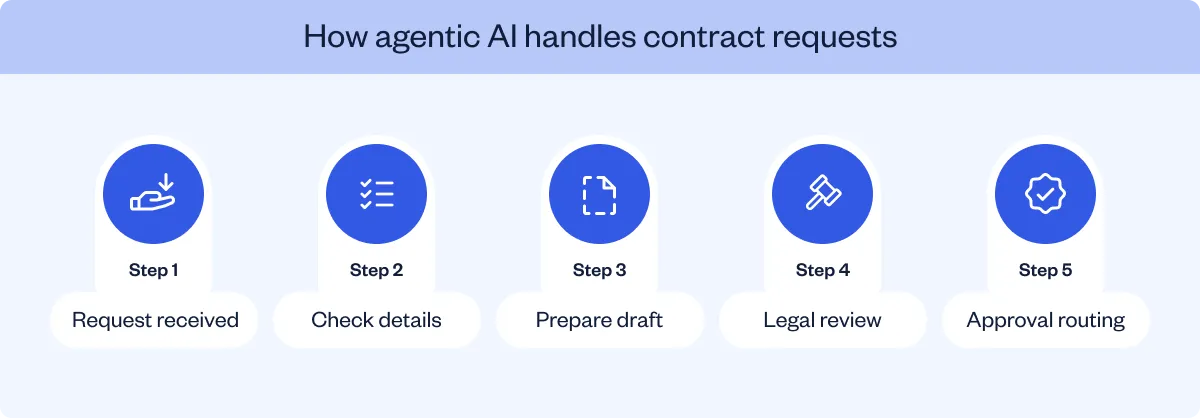
The progression can be described as three levels:
Agentic AI is relevant to contracting because legal work often involves several connected activities. A request may require identifying the contract type, obtaining information from the business, creating a draft, reviewing the terms, and routing the agreement to the appropriate person.
An agent designed for that process could coordinate the initial tasks within defined permissions. The agent should still escalate exceptions and actions requiring legal authorization.
Agentic workflows need the same governance principles as other contract processes, with additional attention to the actions an AI system is authorized to perform.
Buyers should document the systems an agent can access, the information the agent can retrieve, the actions the agent can initiate, and the points at which human approval is required.
For example, a contract intake agent might have permission to request missing information and create an internal draft. The agent should not automatically approve an unusual liability provision or send a legally binding agreement without the required authorization.
The evaluation should include action logs, source references, exception handling, and the ability to stop or correct a task.
CLM platforms are introducing AI agents for contract intake, legal research, clause analysis, repository queries, and workflow assistance.
SpotDraft's agentic AI in legal resource explains how agents can coordinate multiple contracting tasks within defined rules and human oversight.
SpotDraft's Fall Release 2026 also describes AI-supported intake from email, approval evaluation against guidelines, contract-context queries, and connections between Sidebar and enterprise systems. These are vendor-announced capabilities; buyers should establish availability, configuration requirements, and commercial inclusion for the proposed deployment.
The relevant purchasing question is what an agent is authorized and technically able to do within the organization's contracting process. Evaluate those actions directly instead of assuming that an agentic AI label establishes independent execution across the entire lifecycle.
Want to assess legal AI agents in a contracting workflow? Review Sidebar's contract queries, source-grounded answers, and authorized task handling.
SpotDraft combines AI-assisted template creation, contract data extraction, and legal knowledge queries with its contract management workflows. Before signing, Legal and business teams create, negotiate, and approve agreements. After execution, Smart Data Capture and Sidebar help teams work with contract information and approved knowledge sources.
SpotDraft brings contract preparation, negotiation, and approvals into a connected workflow. Legal defines the templates and approval conditions, while business users prepare agreements within those controls. The Contract Editor then supports revisions and negotiation before the agreement moves to approval and signing.
SpotDraft Templates allow Legal to create reusable agreements with questionnaires, variables, and conditional clauses.
Business teams enter the required information, and configured rules populate the template. Legal determines the available language and approval conditions before the template is used.
SpotDraft also documents AI assistance for creating and editing templates. This is separate from the rule-based document generation that occurs when a user completes a questionnaire.
The SpotDraft Contract Editor supports drafting, collaboration, redlining, and version management. Legal teams can review counterparty changes, edit contractual provisions, and maintain version history throughout negotiations.
SpotDraft Workflows provides configurable approval routing. Administrators define the contract conditions and required reviewers, while SpotDraft Sign supports electronic execution once the agreement has received the necessary approvals.
For a representative agreement, Legal can test template-based creation, counterparty redlines, approval routing for nonstandard terms, and the signing process.
Review how SpotDraft connects contract creation, negotiation, approvals, and signing within one workflow.
SpotDraft's contract management software uses AI-assisted data extraction and repository functions to make information from executed agreements available for review, search, and reporting.
Smart Data Capture uses AI to identify contract metadata and suggest values for fields such as dates, parties, monetary amounts, and other agreement details.
According to SpotDraft's documentation, Smart Data Capture presents extracted values with explanations. Users review the suggestions and accept or correct them before relying on the data.
This distinction is important when contracts contain different dates, cross-referenced terms, or clauses that affect how a provision should be interpreted.
SpotDraft's help documentation also describes bulk extraction for up to 200 contracts in an operation, with one credit consumed per successful full Smart Data Capture extraction. Buyers should confirm the credits and extraction scope included in their proposed subscription. Smart Data Capture Lite has separate usage rules for initial field suggestions.
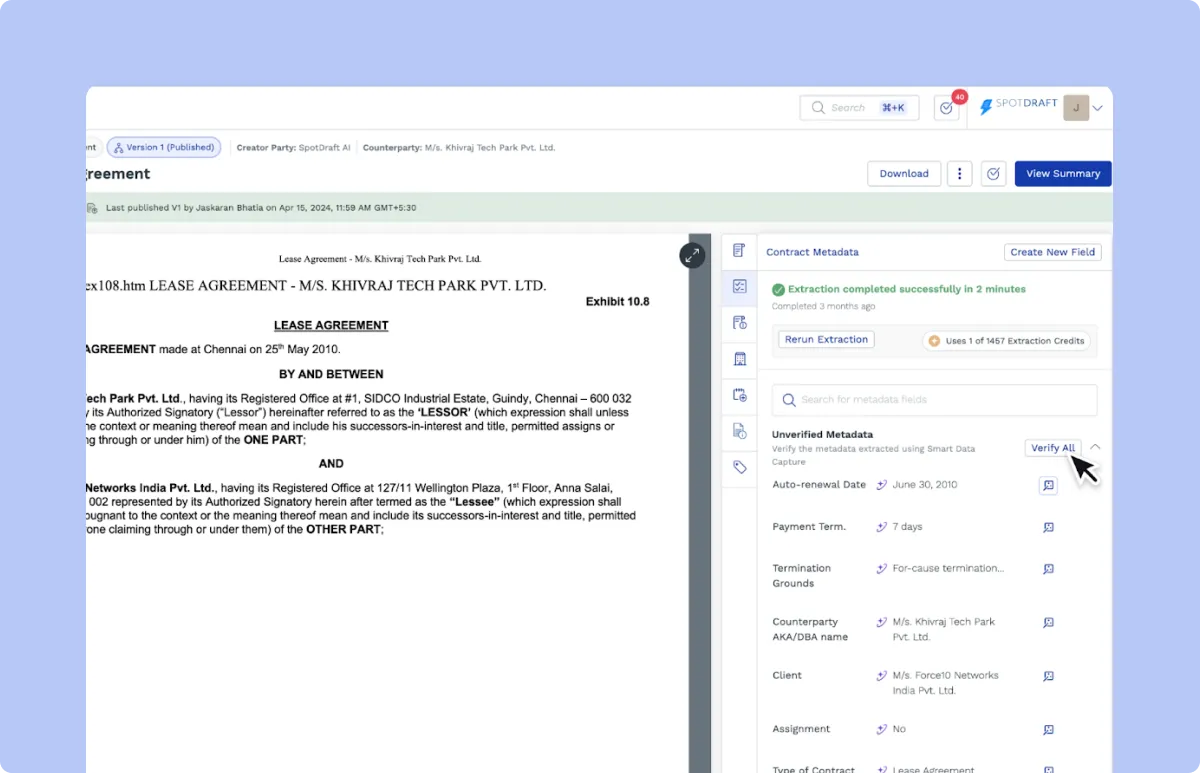
The SpotDraft Contract Repository stores agreements with associated metadata and supports full-text search, metadata filters, saved views, and relationships between contracts.
For example, Legal can search for agreements with a specified counterparty, review approaching expiry dates, and locate related amendments.
SpotDraft's repository documentation also describes AI-assisted extraction across more than 1,000 types of metadata properties. The available information becomes useful for operational reporting once the relevant fields are verified.
SpotDraft Contract Analytics provides dashboards for lifecycle activity, approval requests, reviews, and turnaround times.
These dashboards use recorded workflow information to help Legal Operations examine contract volumes, review workloads, approval durations, and execution performance.
Contract insights derived from AI-assisted extraction complement workflow analytics: the first describe terms and provisions in agreements; the second reports on review, approval, and execution activity.
Sidebar by SpotDraft provides AI agents for legal research, contract questions, clause drafting, regulatory tracking, policy guidance, and other legal work.
Sidebar uses selected knowledge sources, including contracts, internal policies, templates, and documents stored in Knowledge Hubs, to prepare responses.
For example, a legal employee can ask a question about an approved company policy, while an authorized user can query contract information available from the SpotDraft repository.
Sidebar's Knowledge Hubs allow teams to organize internal sources and control availability. Sidebar also provides source references so users can inspect the materials supporting an answer.
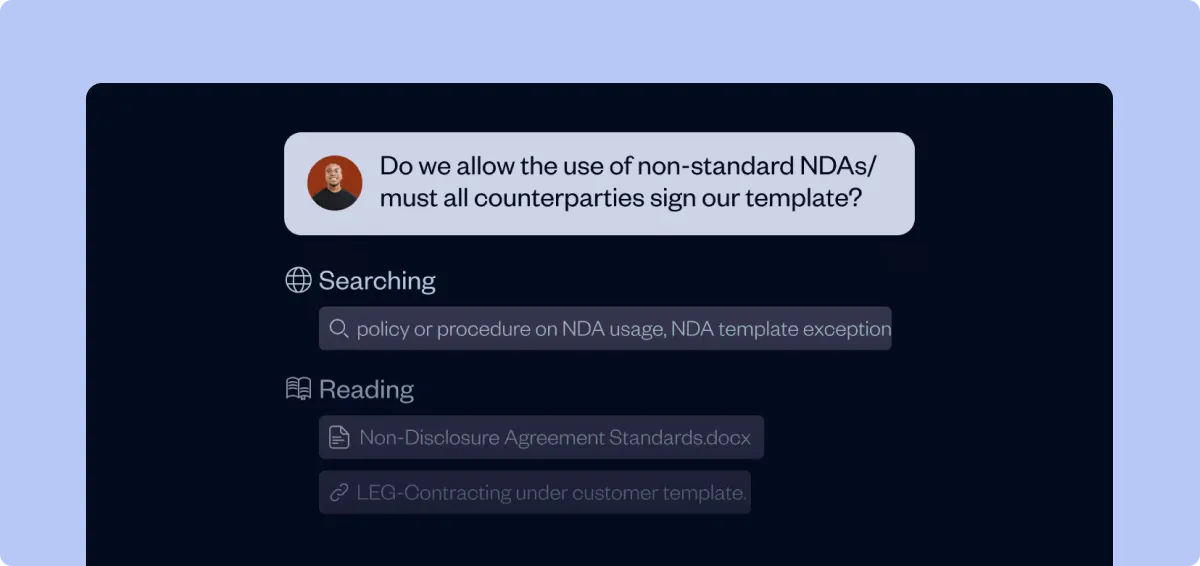
Beyond contract questions and policy guidance, Sidebar supports Slack-based legal requests and regulatory tracking. SpotDraft's Fall 2026 release also introduces AI-assisted email intake, approval checks against legal guidelines, and connections with enterprise systems. As these capabilities become part of everyday legal workflows, teams need to establish which agents are available, what information they access, and which actions require human approval.
These requirements should also be reflected in the commercial proposal. SpotDraft offers custom pricing based on users or contract volume, with in-house implementation, workflow and integration setup, legacy migration, dedicated customer success, and 24/7 support included. Buyers should confirm which AI capabilities, agents, and usage credits are covered by their subscription.