What integrations should enterprise CLM software support?
Enterprise CLM software supports the systems used to request, approve, sign, and administer agreements. Common categories include CRM, ERP, HR, procurement, CPQ, accounting, eSignature, storage, collaboration, intake, identity, reporting, and GRC. Buyers need to verify each connector's supported records, synchronization direction, and implementation requirements.
How does enterprise CLM integrate with Salesforce?
Enterprise CLM integrates with Salesforce by using customer or opportunity data to prepare agreements and returning selected contract updates to Salesforce. Our Salesforce integration supports standard and custom objects, CPQ information, and two-way synchronization. Configuration determines the fields, triggers, and records involved in that exchange.
How does CLM integrate with SAP?
CLM integrates with SAP by exchanging agreed contract data with ERP records through a supported connector, middleware, or API. SpotDraft APIs and webhooks support compatible SAP use cases, although SAP is not listed as a native connector. Legal and IT need to confirm the relevant SAP objects, endpoint coverage, and amendment-handling process.
How does enterprise CLM integration improve contract workflows?
The benefits of contract lifecycle management integration include less duplicate data entry and fewer separate handoffs between business applications. CRM information can populate drafts, reviewers can receive notifications, and executed documents or metadata can move downstream. Organizations can assess the results through contract turnaround, user adoption, manual corrections, and synchronization failures.
Krishnapriya Agarwal is an Ex-Content Marketing leader at SpotDraft and an experienced marketing professional with a strong background in digital marketing, content strategy, and team management. She has led content teams and driven SEO-focused initiatives to support business growth.
TL;DR
CLM integration connects contract management with the applications that initiate agreements and use contractual data after signing. Enterprise teams commonly assess 13 categories, including CRM, ERP, procurement, HR, eSignature, and business intelligence.
Salesforce integrations can generate contracts from deal records and return contract status to Sales. SAP connections require a defined API or middleware scope; SAP is not listed as a native SpotDraft connector.
Native connectors have different capabilities. Contract information syncs both ways between SpotDraft and Salesforce, while Google Drive receives executed PDFs through a one-way export.
Successful implementation starts by identifying a single source of truth for each shared field and testing a representative workflow. Teams then test approvals, permissions, synchronization failures, and contract amendments before deploying the connection.
At SpotDraft, we integrate with Salesforce, HubSpot, Coupa, Greenhouse, Docusign, Jira, Slack, and other business tools. Public APIs also support compatible custom workflows.
Sales updates pricing in Salesforce, but Legal receives a contract with the earlier amount. Once signed, Finance must manually confirm which terms should update the billing record in its financial systems. Every team has done its part, yet the same transaction has three versions of the commercial information.
A CLM integration connects the applications handling these stages and defines the handoffs that otherwise require manual effort. Sales continues working in its CRM, Legal manages the approved agreement, and Finance receives the information required for its downstream workflow.
Enterprise buyers need to establish which connections are available, what each one transfers, and where custom development is required. This guide covers 13 integration categories, followed by the technical and procurement checks needed to put them into operation.\
How CLM integration supports enterprise contract workflows
Contract lifecycle management integration connects contract lifecycle management software with applications that hold the records used to create or administer agreements. A CLM platform handles drafting, negotiation, approvals, signing, and repository management. CRM, ERP, and procurement applications handle different records associated with the same transaction.
Consider a supplier purchase. Procurement teams initiate the request, Legal approves the supplier agreement, and Finance authorizes payment. An integration determines which records move between these applications and whether execution or another event triggers the transfer.
Workflow automation serves a specific handoff between applications. CRM data can populate a contract template, collaboration tools can notify approvers, and storage systems can receive executed PDFs. Adoption is measurable when employees start agreements from the intended application instead of sending separate requests. Contract management ROI can then be evaluated against the manual work and turnaround time recorded before deployment.
The broader CLM integration guide explains integration fundamentals. For enterprise procurement, the focus is the exact system, field, and workflow coverage required.
13 essential CLM integrations for enterprise teams
The 13 categories below cover where contracts intersect with enterprise systems used across business operations. They are not a list of 13 guaranteed native SpotDraft connectors. The connection method and supported actions must be verified for each application.
1. CRM integrations: Salesforce, HubSpot, and Zoho
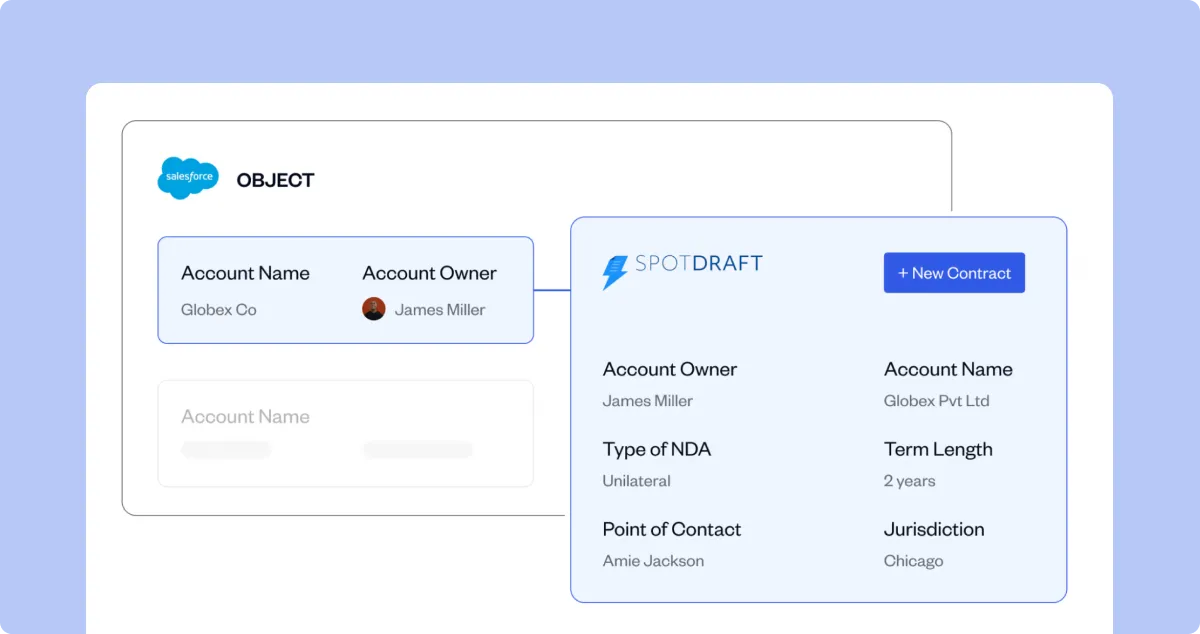
A CRM CLM integration connects a customer opportunity to the agreement that formalizes the deal. Sales initiates contracting from the CRM, while the legal team controls approved contract language and approval routing.
Sales teams can create contracts in SpotDraft from Salesforce Accounts, Opportunities, or configured custom objects through the Salesforce integration. Mapped fields populate the agreement, including Salesforce CPQ quote and line-item data. The Salesforce page widget displays contract status and related information, while reverse synchronization can return selected metadata, documents, or status updates to configured records.
An enterprise with multiple Salesforce organizations can connect them to one SpotDraft account, subject to the configured setup. Contract-creation conditions can also restrict when an opportunity becomes eligible for an agreement.
HubSpot and Zoho users can also initiate SpotDraft contracts from their CRM records through the HubSpot and Zoho integrations. For each platform, verify the supported objects, nested fields, and synchronization direction in the proposed implementation.
For a demo, create an agreement from a Salesforce Opportunity, route an exception for approval, and verify the update returned to the original record.
2. ERP integrations: SAP, Oracle, NetSuite, and Dynamics 365
An ERP CLM integration exchanges approved contract information with finance and operational systems. These applications manage supplier records, purchase orders, invoicing, and accounting; Legal manages the agreement authorizing the transaction.
An SAP integration might take a supplier ID and purchasing request from SAP to initiate a SpotDraft agreement. After contract execution, a configured connection could retrieve the signed document and selected metadata for the associated SAP record. That process requires field mapping and a decision about how amendments update the downstream record.
The first integration test can follow a purchase request with a supplier identifier and an approved value. After Legal signs the agreement, inspect whether the downstream purchasing record receives the intended contract reference. Amend the payment terms and repeat the test. The project scope needs to state whether that second update is automated or requires an authorized user to initiate it.
Oracle, NetSuite, Microsoft Dynamics 365, and Infor require the same evaluation. The relevant question is whether the connection can transfer the financial terms your process needs, with a record owner responsible for reconciling errors.
Bring your SAP or ERP data flow to a SpotDraft demo to review API coverage and implementation scope.
3. HR integrations: Greenhouse and other HR systems
An HR integration uses candidate or employee records to prepare agreements, reducing repetitive tasks such as copying names and offer details into templates. Recruiters might initiate an offer letter after approving a candidate's salary and start date.
Recruiters can use mapped candidate and offer information from the Greenhouse integration to populate SpotDraft templates. The current Greenhouse setup guide also documents optional metadata synchronization that can return negotiated offer values and status updates to Greenhouse when separately configured.
That means buyers need to distinguish the standard data pull from the additional sync-back setup. Test missing compensation fields, currency mapping, and whether an amended offer updates the correct candidate record. Lever and other HR systems may require a different connector or API implementation.
4. eSignature integrations: Docusign and native signing
An eSignature integration connects an approved agreement to a signing workflow. The signer sequence and executed document need to remain associated with the contract record as part of an audit trail showing which version was accepted.
Teams can sign approved agreements directly using SpotDraft eSignatures or send them through the Docusign integration. The executed agreement remains linked to the contract record. SpotDraft's Fall 2026 release also introduces an Adobe Sign connection for sending agreements and tracking signature status. Buyers should confirm availability and setup requirements for their account.
During evaluation, test a declined signature and a request involving several signers. Confirm which audit evidence is retained and how an incomplete request is reflected in CLM. Other eSignature products require separate verification rather than an assumption that all providers have native connectors.
5. Cloud storage integrations: Google Drive, Dropbox, and SharePoint
Cloud storage integrations support downstream document management by distributing signed agreements to departments that use shared libraries. Legal can retain the managed agreement in its contract repository while a designated team receives a PDF through its existing storage application.
The Google Drive connector exports executed PDFs from SpotDraft into designated folders using configured file names. The transfer is one-way: edits to the exported file in Drive do not update the SpotDraft agreement, so version control must distinguish the exported copy from the managed contract. Only one Google Drive integration is supported per SpotDraft workspace under the documented setup.
The integrations catalog also includes Dropbox, SharePoint, OneDrive, and Box. For each one, confirm which documents are exported and who controls folder access. The managed agreement and its contract record remain accessible through the centralized repository in SpotDraft.
6. Project management and collaboration integrations: Jira, Slack, and Teams
Business users often request contracts through tickets or discuss approvals in messaging apps. A collaboration integration links those activities to the contract process instead of leaving Legal to reconstruct the request from separate conversations.
From Jira tickets, teams can create SpotDraft contracts, submit attached third-party agreements for review, and link executed PDFs back to the original issue using the Jira integration. Jira events or configured manual triggers initiate the process.
Reviewers receive SpotDraft contract notifications and perform supported approval actions through the Slack integration. Contract notifications are also available through Microsoft Teams. In a demo, trigger an approval and check what the reviewer can see or do without exposing restricted contract comments.
See a Jira-generated contract and its approval notification in Slack as part of one workflow.
7. Procurement and source-to-pay integrations: Coupa and SAP Ariba
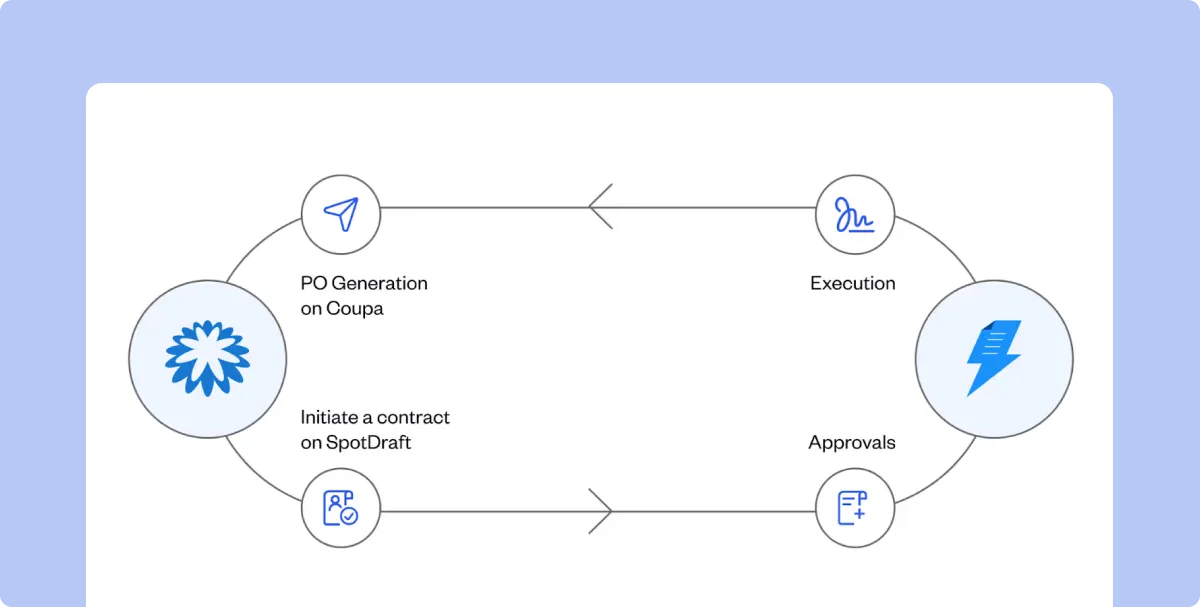
Procurement integrations connect supplier requests and purchasing records to the agreements Legal approves. If Procurement also monitors supplier performance, buyers should check which contract terms are available for those reviews. A vendor contract can begin with a request containing the supplier details and required commercial information, then return an execution update to Procurement.
Coupa users can initiate an agreement, complete review and execution in SpotDraft, and return the relevant contract information to Coupa for purchase-order creation through the Coupa integration. The connector supports configured data exchange between the two systems.
SAP Ariba is a possible enterprise procurement requirement but is not a listed native SpotDraft connector. Document the required records and API approach separately. For the underlying agreement process, see the procurement contract management guide.
Configure, price, quote (CPQ) integrations transfer approved product and pricing information into the agreement. This differs from a general CRM connection because an order form might contain several line items, each with quantities or pricing details that must match the approved quote.
Salesforce CPQ quote and line-item data can populate dynamic tables in SpotDraft contracts. A sales representative can therefore prepare an order form from approved commercial information while Legal controls the contractual language.
Test a revised quote before launch. If a product is removed or pricing changes, the workflow needs to populate the revised terms and apply any required approval rule. Contract generation must follow the organization's quote approval process without bypassing authorization.
9. Accounting and invoicing integrations: QuickBooks and Xero
Accounting integrations connect contract execution to invoicing, while revenue recognition remains governed by Finance's accounting policies. An approved customer agreement might authorize an initial invoice, but the finance record needs the correct customer and payment information before that document is issued.
Using the Zapier integration, a SpotDraft Contract Executed event can trigger invoice creation in QuickBooks or Xero. This is a middleware-based workflow.
Finance needs to test contract value, currency, tax treatment, and duplicate execution events in the proposed configuration. The accounting application remains responsible for its invoicing rules; the integration supplies the event and mapped information required by that process.
10. Identity and access integrations: Okta
Identity integration lets IT manage access to the CLM system through established employee accounts. The connection is concerned with authentication and provisioning rather than moving agreement content.
The Okta connector supports SAML single sign-on (SSO) and SCIM user provisioning for SpotDraft accounts. Depending on setup, IT can create, update, deactivate, or reactivate users and synchronize supported group membership with SpotDraft teams.
An enterprise test covers onboarding and offboarding, particularly the removal of access when an employee leaves. SSO availability depends on the workspace subscription, so confirm entitlement and administrator requirements before including the connector in the rollout plan.
11. Contract intake and form integrations: Google Forms
Contract intake integrations turn structured requests from business units into drafts. A team requesting a recurring NDA, for example, can provide counterparty information through a form without preparing the document itself.
Once connected, Google Forms submissions can generate template-based contracts in SpotDraft. Administrators map form responses to the relevant contract questionnaire fields and establish which template is used.
This particular connector supports SpotDraft template workflows; the published setup does not support third-party paper or upload-and-sign requests. For those agreement types, buyers need to assess another intake method. Test required field labels and the behavior of incomplete submissions before giving the form to employees.
12. Business intelligence and reporting integrations: Power BI and Tableau
Business intelligence (BI) integrations support contract performance analysis by combining agreement terms with related financial or operational data. Finance may need approved contract values beside invoiced amounts, while Legal tracks request volumes and time spent awaiting approval.
SpotDraft Contract Analytics reports on contract activity and processing times. Power BI and Tableau are not listed as native SpotDraft integrations. External reporting therefore needs an agreed extraction method using available APIs or another supported connection.
Define the performance monitoring metrics and reporting frequency before development. A dashboard that combines finance and contract records also needs stable record identifiers, permission controls, and a process for correcting outdated metadata.
13. Governance, risk, and compliance integrations
Governance, risk, and compliance (GRC) integrations connect obligation tracking with risk management and audit controls. A supplier agreement, for example, might require periodic evidence of insurance or an annual security certification.
A configured connection could send the obligation and its due date to a GRC record so the responsible team can follow up. The implementation must distinguish contractual duties from regulatory requirements and explain what happens when a contract is amended or expires.
ServiceNow GRC and OneTrust are examples of potential enterprise target systems, not published native SpotDraft connectors. Validate the required contract fields and available API endpoints before defining the integration scope.
Review the integration methods available for your 13-category enterprise stack and identify which require custom work.
Technical requirements for enterprise CLM integration
After selecting the applications, Legal and IT need to identify the internal stakeholders responsible for each data transfer. Native connectors, middleware, and public APIs provide different paths, but each requires field mapping and an owner for failures.
Requirement
What to establish
Source record
Which CRM, ERP, or procurement ID links to the contract
Field ownership
Which application provides each commercial or status value
Synchronization
Whether updates are one-way or two-way and what triggers them
Security
Authentication, credentials, user roles, and data visibility
Exceptions
Handling for missing data, duplicate requests, and failed transfers
Maintenance
Who updates the connection when fields or APIs change
Select the integration method after identifying the data and actions involved:
Method
Appropriate use
Operational responsibility
Native connector
Published workflow for an application such as Salesforce or Coupa
Configure mapped fields, access, and supported triggers
Integration middleware
Supported automation across applications without a direct connector
Maintain the middleware account, event mapping, and failure alerts
APIs and webhooks
Custom workflows involving ERP or internal applications
Develop the connection, secure credentials, monitor events, and maintain code
Our public APIs support compatible flows such as contract creation, metadata retrieval, and downstream status synchronization. Webhooks notify external applications when lifecycle events occur. Developers need to retrieve the current record where authoritative data is required, instead of relying on an older webhook payload.
The developer FAQ also recommends testing in a QA workspace, preserving stable external record IDs, and implementing retries. SpotDraft applies a documented public API rate limit of ten requests per second per workspace; larger workloads need appropriate queueing and backoff.
Contract amendments require a separate design decision. If Finance has already received the original payment schedule, a revised contract cannot safely be treated as a new unrelated record. The integration needs to identify the original agreement, recognize the amendment, and send the approved update to the same downstream record. Include that scenario in testing, especially where ERP or procurement systems use contract terms after signing.
How to roll out CLM integrations across departments
An enterprise CLM solution should first be tested using one complete agreement. Begin with the business system holding the request, then trace the contract through approval, signing, and downstream administration.
Select the workflow. Identify the agreement type, requesting team, connected applications, and manual processes that the integration is intended to replace.
Map the data. Standardize fields and status values, assign system ownership, and record identifiers used for reconciliation.
Test in QA. Verify approvals, permissions, executed files, duplicate events, and failed synchronization before production deployment.
Pilot with users. Have a limited team initiate contracts from its usual application and report where manual work remains.
Measure and expand. Compare contract turnaround, error rates, and adoption with the initial baseline to assess operational efficiency before adding other departments.
The CLM implementation guide covers the broader rollout, including workflow configuration and migration. The integration plan also records which connectors, API access, and implementation services are included in the commercial proposal.
Test a representative agreement with our team, including its source record and the downstream status update.
How SpotDraft supports connected enterprise contracting
We connect contract requests from business tools to the legal team's contract review and execution process. Templates populate approved language with mapped data, while Workflows routes agreements to the required approvers. The executed agreement remains available in the repository.
A Salesforce user can generate an agreement from an opportunity and view its status without sending Legal a separate update request. A Coupa user can initiate a supplier agreement and receive the information needed for the purchasing process. Native connectors handle documented use cases. Custom requirements need a technical review of the available API endpoints.
In SpotDraft's Wingify case study, Wingify reports a 65% reduction in contract cycle time and says 75% of its contracts are generated through Salesforce following the integration.
For your evaluation, use one of your existing agreements to test the same sequence. Start in Salesforce or the system where the request originates, submit a non-standard clause for Legal review, and complete signing. Then return to the originating record to inspect the updated contract status. This also helps identify any activity that still requires a manual transfer.
Review SpotDraft's supported integrations and contracting workflow with your CRM and Legal operations teams.
“Before using SpotDraft, executing a contract would take up to weeks. Now, contracts are signed within minutes, with better data security and tracking. The whole process takes us less than a day!”
Arti Singh
Founder’s Office, Growth, UrbanVault
“Before using SpotDraft, executing a contract would take up to weeks. Now, contracts are signed within minutes, with better data security and tracking. The whole process takes us less than a day!”


.webp)