CLM Implementation Guide: Steps, Timeline & Best Practices

Huzaifa Sultana is a Marketing Associate at SpotDraft focusing on Organic Growth through SEO and AEO.

A successful CLM implementation requires planning across contract data, approval workflows, integrations, and users. The more contract types, approval paths, legacy agreements, and business systems you bring into the first rollout, the more work there is to complete before go-live.
Before a new CLM or CLM system is configured, define which workflow goes live first, what contracts and data need to move, which key stakeholders need access, and which systems have to connect. Those decisions shape the implementation timeline and determine how much work your internal team and CLM vendor need to complete.
This article covers the CLM implementation steps, timeline, common rollout challenges, costs, and a practical CLM implementation roadmap for getting from planning to go-live.
CLM implementation is the process of setting up contract lifecycle management software around your contracts, workflows, users, data, and business systems, then testing the setup and moving teams onto the new process.
A CLM solution becomes operational only after those workflows, contracts, integrations, permissions, and users are configured and tested for the way your team actually works.
A typical contract lifecycle management implementation includes several connected workstreams:
The implementation process should tie back to the business goals that led to the CLM investment and the business outcomes the first rollout is expected to improve. Approval delays call for better routing and visibility. Scattered agreements make migration and repository setup a priority. Repeated drafting work points toward templates and self-service.
That connection between problem and configuration is also central to our CLM best practices. You want the platform configured around the process you plan to run, with each workflow solving a specific operational problem.
You are ready for CLM implementation when you can identify the contract problems you want to fix, the workflows involved, and the people who need to participate in the rollout.
You do not need every edge case mapped before the project begins. You do need enough information to give the first phase a defined scope.
Before kickoff, your team should be able to answer questions such as:
If the answers are spread across legal teams, Sales, finance teams, procurement teams, and IT, bring those owners into the project early. Resolving approval rules and integration requirements after configuration begins can require workflows or integrations to be reconfigured.
Teams still evaluating the wider process can use our explanation of what contract lifecycle management covers before mapping the implementation itself.
There is no single CLM implementation timeline because the amount of setup varies with your contracts, data, workflows, integrations, and rollout scope.
For SpotDraft, our public implementation journey begins with process discovery and setup in Week 1 and reaches go-live by Week 6, with migrated contracts, templates, approvals, and integrations ready. Customer timelines can differ from the published journey. Open, for example, reports completing onboarding and implementation in two weeks, including migration of its existing contracts and metadata.
A realistic timeline should specify what will actually be ready on the go-live date:
A scoped implementation timeline should define what will be operational at go-live. For example: “NDAs and sales agreements are live with Salesforce, approvals, eSignature, and migrated active contracts.”
Our public implementation journey currently shows this Week 1-to-Week 6 progression.
Get an implementation plan based on your contract types, migration scope, and integrations.
Contract data, workflow complexity, integrations, rollout scope, and adoption determine how much work a CLM implementation requires.
These workstreams also affect one another. Poorly organized contracts take longer to prepare for migration. Undefined approval rules hold up workflow configuration. Integrations wait when IT or system owners join the project late. A finished configuration delivers little value when the people who request and approve contracts continue working through email.
Here is where the work tends to grow:
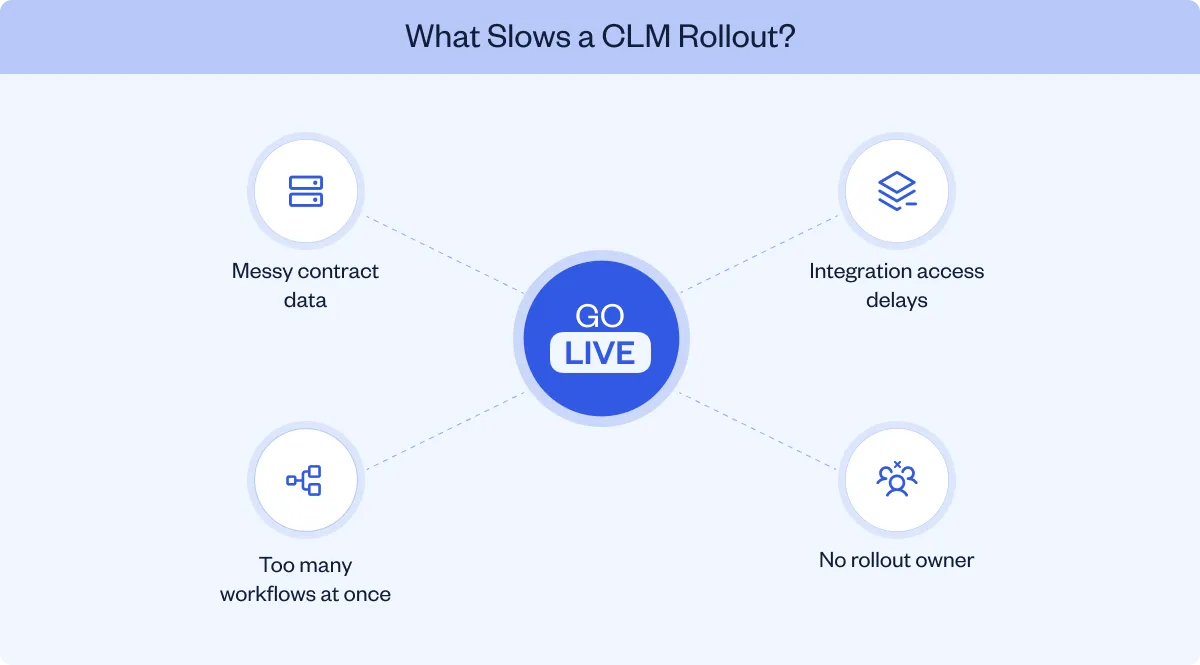
Before migration, assess where contracts are stored, which versions are current, and whether the metadata required for search and reporting is complete. Files sit across shared drives, email accounts, existing tools, and folders owned by individual employees. The same agreement may exist in several versions, while key metadata lives in spreadsheets or nowhere at all.
Set the migration scope before moving files. Identify which agreements need to move into the central repository and which contract data the new system needs to maintain as a single source of truth. Identify active and important contracts, determine which metadata you need for search and reporting, remove obvious duplicates, and decide which historical records belong in the first migration wave.
Our contract data migration resource goes deeper into preparing the contract library for this work.
With SpotDraft, legacy-contract migration is handled by our in-house implementation team and included without an additional implementation fee.
Bring your current contract library and see what the migration would involve.
Your team needs workflows that match how contracts actually move through the business. At the same time, loading every unusual scenario into phase one creates more configuration and testing before anyone gets to use the system.
Start with the route most agreements follow. Map intake, contract creation, contract review, approval workflows, contract execution, and repository storage before adding exceptions.
Once that path works, add the exceptions that occur frequently enough to justify workflow automation. Our contract management workflow resource can help with the process-mapping stage.
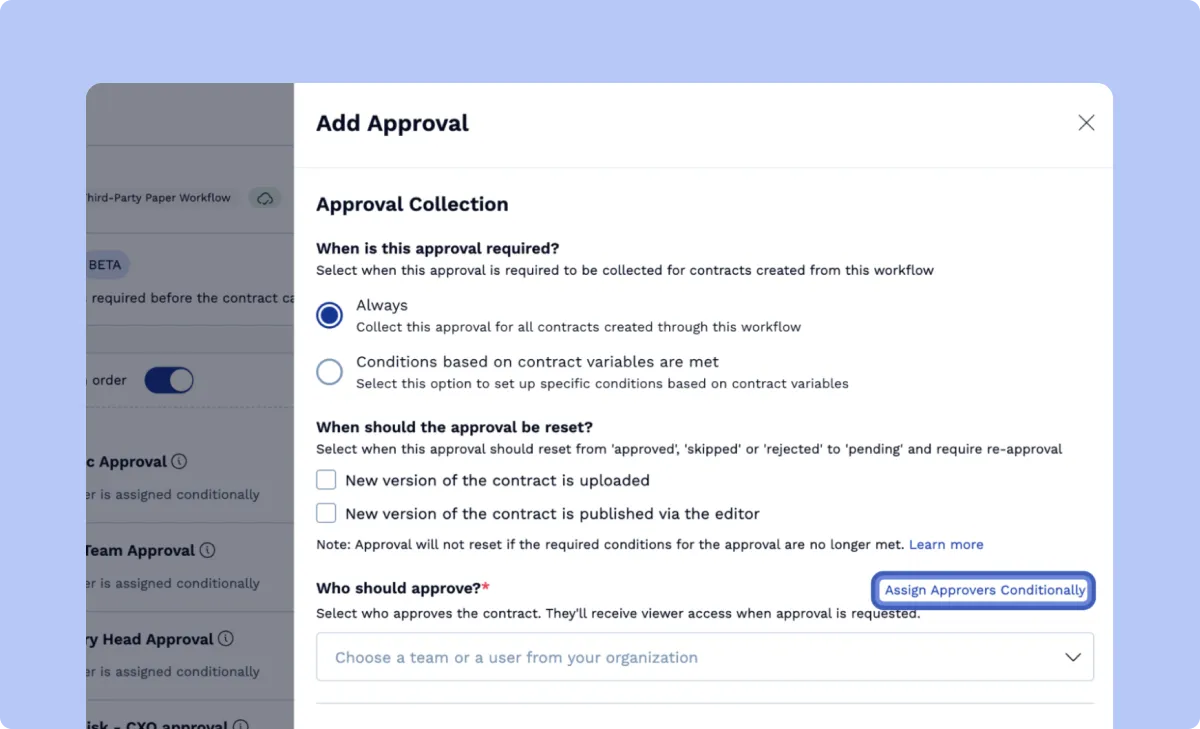
SpotDraft Workflows supports conditional approval routing based on contract data, so different contracts can follow different review and approval paths from the same underlying workflow.
Integrations often involve teams outside Legal. Salesforce needs its system owner. SSO brings in IT. Procurement, HR, storage, and communication tools can each introduce a separate dependency.
List the phase-one integrations during planning and identify the owner of each system. Then decide what the integration actually needs to accomplish. A CRM connection that lets Sales create contracts and see status solves a different problem from an integration that only transfers completed files.
Our essential CLM integrations resource covers the most common systems and workflows, while the SpotDraft integrations catalog shows the connections available today.
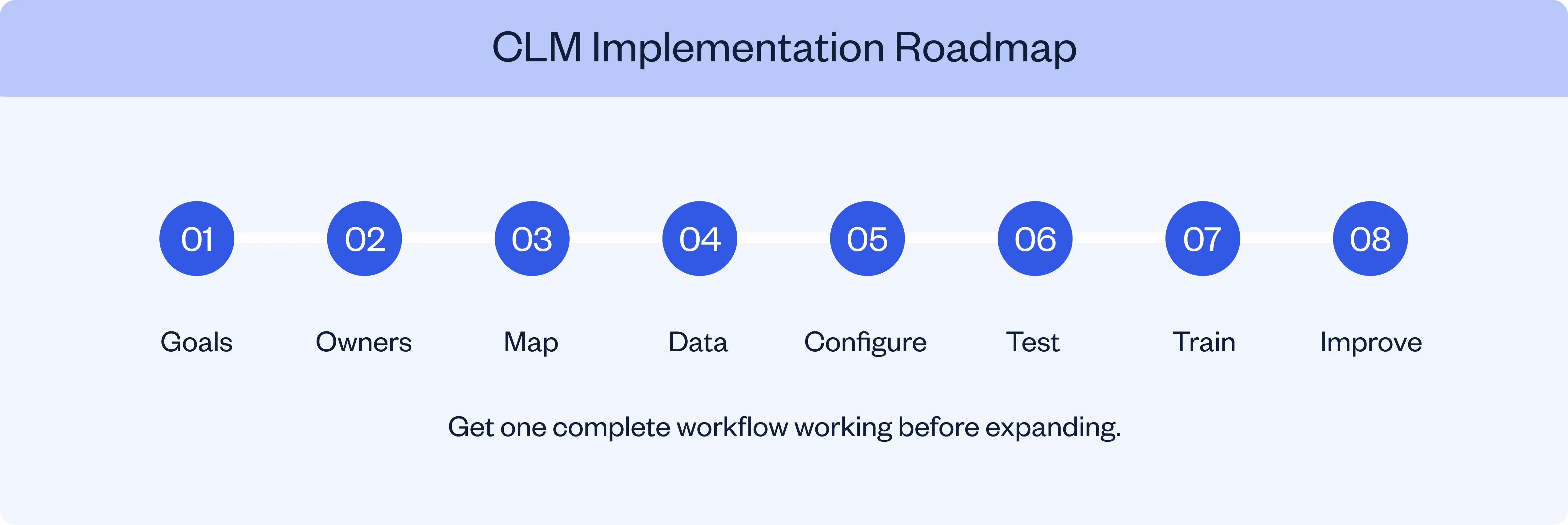
The core CLM implementation steps are defining the outcome, assigning ownership, mapping the process, preparing contracts and data, configuring the system, testing complete workflows, training users, and improving the setup after go-live.
The sequence gives each phase something concrete to produce before the next one expands the scope.
Define the business goal for the first rollout and record the current baseline so the CLM investment can later be evaluated against measurable business outcomes and any expected cost savings.
Useful measures include:
These metrics give you a way to evaluate the rollout later. Our contract management ROI framework can help connect process improvements with the wider CLM business case.
A cross-functional implementation still needs one person responsible for keeping it moving.
The owner coordinates change management, tracks dependencies, brings the right stakeholders into reviews, and makes sure testing happens on time. They do not need to configure every technical detail themselves.
Legal or Legal Ops will usually work alongside people from Sales, Finance, Procurement, IT, Security, and the teams that own connected systems.
Document the current processes a real contract follows today and identify process gaps, manual tracking, duplicate entry, and unclear ownership.
Follow it from the request through:
For each stage of the contract lifecycle, also document any legal requirements and regulatory requirements that affect review, approval, access, retention, or execution.
Look for repeated handoffs, duplicate data entry, approvals that have no defined trigger, and places where the contract disappears from view.
This process map becomes the basis for configuration. It also helps you decide which existing steps are worth carrying forward.
Identify the approved version of each phase-one template and retire copies that business teams should no longer use.
Then prepare the contract library. Define the metadata fields you need for search, reporting, renewals, permissions, and downstream integrations. Migration gets much easier when the team agrees on these fields before files start moving.
Our legacy contract migration resource covers this work in more depth.
Build the first contract types end to end. That includes the template or upload route, intake questions, reviews, approvals, signing, repository fields, user permissions, and the business systems that the workflow needs.
Keep phase one tied to the use case you selected earlier. Extra workflows can follow once the team has a finished process in production.
For example, a sales agreement rollout might combine SpotDraft Templates, Workflows, native eSignatures, and our Salesforce integration so Sales can work from the CRM while Legal controls the underlying contracting process.
Bring one contract type and one integration and see what its setup would involve.
Run real test agreements through the full process before go-live.
A template generating correctly only proves one part of the workflow. Test what happens when:
Testing these paths catches problems while the implementation team can still adjust the configuration.
Different users need different training.
A Sales rep needs to know how to request or create an agreement and follow its status. An approver needs to know how to review and act. Legal Ops needs deeper knowledge of templates, workflows, permissions, reporting, and administration.
Training becomes easier when the experience itself guides the user. Structured intake, for example, asks the business team for the information Legal needs instead of expecting the requester to know the entire legal process.
See how SpotDraft Legal Intake works for requests that need a structured route into Legal.
Once the first workflows pass testing, move them into production, monitor CLM adoption, and confirm who provides ongoing support as users begin working in the system.
Watch how people use the process. If a step causes repeated questions, fix it. If business users leave the CLM to complete part of the workflow elsewhere, find out why. If the first workflows are stable, bring the next contract type or integration into the rollout.
The next step is to expand the CLM implementation roadmap only after the first workflow is stable and producing the expected result.
A faster CLM implementation keeps the first release focused on a defined problem, a manageable set of contracts, and the systems required to run those workflows.
Five practical decisions keep scope under control:
The current SpotDraft implementation page follows the same phased logic: focus the initial launch, move priority contracts, and expand after the first workflows are working.
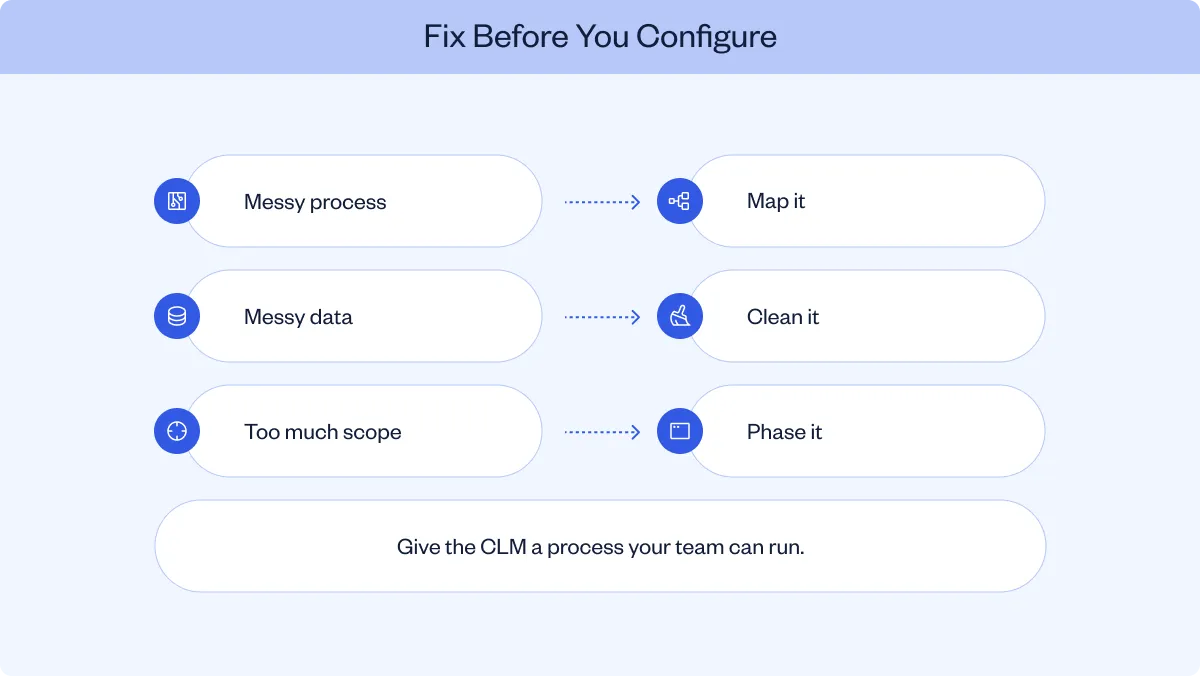
Common pitfalls in CLM implementation include automating undefined current processes, migrating inconsistent data, expanding phase-one scope too far, involving stakeholders late, and overlooking adoption after launch.
These common challenges are easier to address when they are identified during planning:
A CLM implementation checklist should cover objectives, owners, workflows, data, integrations, permissions, testing, training, launch, and post-launch measurement. The checklist should also capture risk management responsibilities, security controls, legal requirements, and regulatory requirements that affect the rollout.
Use this before you approve the rollout:
Keep this CLM implementation checklist active throughout the project. It works best as a project control document, with an owner and status beside each item, rather than as a one-time readiness exercise.
Bring your implementation checklist and test it against SpotDraft with your own workflows.
CLM implementation cost varies by vendor and scope, so compare the first-year commercial package across software, setup, migration, integrations, training, and support.
When comparing CLM platforms, give each vendor the same migration scope, workflows, integrations, and success criteria so the commercial comparison reflects equivalent work.
Ask each vendor to spell out what the quote includes across:
This is where superficially similar CLM quotes can diverge. Our CLM software pricing resource covers these cost categories in more detail.
At SpotDraft, we price plans based on users or contract volume. Our in-house implementation is included, including workflow and integration setup and legacy-contract migration, and every customer receives dedicated customer success and 24/7 support.
For the SpotDraft-specific commercial model, see our pricing page.
Your CLM implementation worked when the workflow is being used and the operational problem that justified the project starts improving.
Measure the same metrics you established before rollout. Contract analytics should connect the implementation back to the business goals that justified the project.
Where post-signature obligations are part of the rollout, define how contract performance will be measured alongside renewal and obligation data.
Customer results are useful here when they stay tied to the customer that reported them. Open completed its SpotDraft onboarding and implementation in two weeks. It later reported a 90% reduction in contract approval turnaround time and a 65% reduction in errors or discrepancies in contract terms.
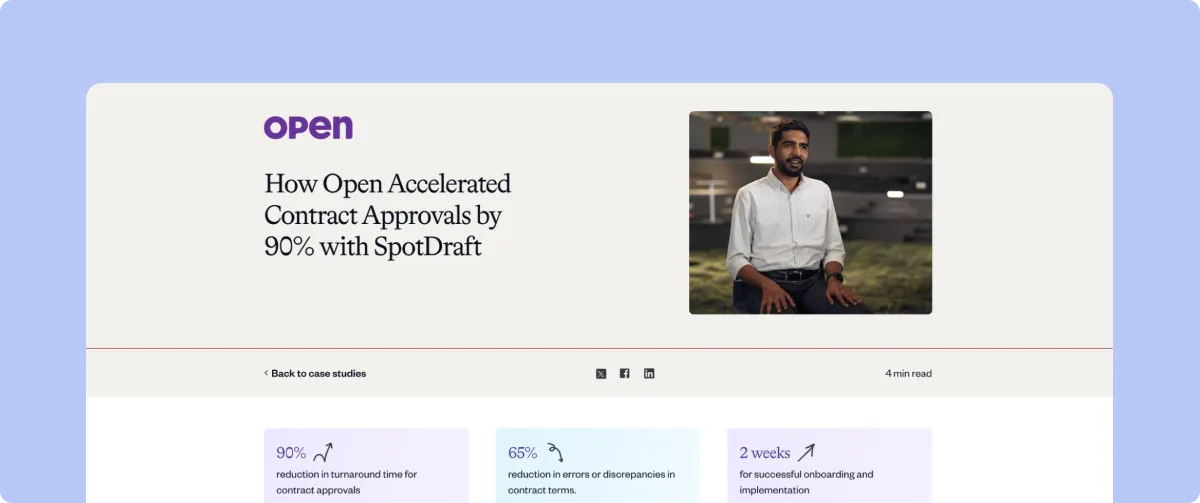
These are Open’s reported results from its own rollout, so the screenshot gives the reader a real implementation example without presenting the outcome as a universal benchmark.
Define the implementation metrics you want to improve before your rollout begins.
We handle CLM implementation in-house, including workflow and integration setup and legacy-contract migration. Our implementation team works alongside your team from initial setup through go-live. Confirm the ongoing support and customer success scope included in your proposal for the post-launch period.
The implementation covers the work discussed throughout this article:
Our public implementation journey runs from Week 1 discovery and setup to a Week 6 go-live with migrated contracts, templates, approvals, and integrations ready. Actual implementation scope still comes from your contracts, workflows, users, and connected systems.
That gives the implementation conversation a practical focus from the beginning: what needs to move, what needs to be configured, which teams need to participate, what is expected to be live, and how we will support the rollout afterward.