Huzaifa Sultana is a Marketing Associate at SpotDraft, specializing in organic growth, SEO, and AEO. Her work focuses on content optimization, keyword research, and developing strategies to improve search rankings and organic visibility.
TL;DR
SpotDraft vs Ironclad vs Juro compares three CLM platforms across editing, workflows, implementation, AI, integrations, and pricing. Buyers should compare capabilities, included services, and total costs against the same requirements.
All three platforms support Microsoft Word workflows. Juro offers a Word add-in across plans, while Ironclad supports Word editing and Jurist. Compare redlines, comments, attachments, and version history.
Ironclad's Workflow Designer supports launch forms, permissions, and conditional routing, while Juro offers templates and no-code workflows. Test administrator access, approval changes, and workflows already in progress.
Juro reports average onboarding of 21 days, while Ironclad offers self-led, vendor-assisted, and partner-led deployment. Compare migration, integrations, training, and implementation responsibilities before assessing timelines.
Neither Juro nor Ironclad publishes standard CLM subscription prices. Juro prices by contract volume and integration complexity, while Ironclad defines users, modules, APIs, and services in its Order Form.
Juro publishes usage limits for AI Review and Operator, while eligible Ironclad AI-agent actions consume credits. Compare playbook controls, AI allowances, and additional usage charges.
For teams prioritizing in-house implementation, Word editing, configurable approvals, native eSignatures, and legacy migration, SpotDraft brings these capabilities together with dedicated customer success and 24/7 support.
SpotDraft, Ironclad, and Juro are legal tech vendors. Each provides a contract management platform for agreement creation, negotiation, approvals, signing, and post-signature management. Their documented capabilities overlap, but their workflow configurations, implementation services, access models, and commercial structures differ.
SpotDraft combines contract editing, configurable workflows, native eSignatures, repository management, and legal AI, with in-house implementation included in its pricing model. Ironclad provides Workflow Designer, Jurist, native signing, and multiple deployment options. Juro offers collaborative contracting, unlimited users, workflows, and templates, and Microsoft Word editing across its plans.
Legal ops coordinates with contract owners across Sales, Procurement, and Finance as agreements move from drafting to signature. These commercial teams need to access information on document changes, approvals, and executed contracts, with permissions appropriate to their roles.
A like-for-like evaluation should also identify implementation responsibilities, AI usage, integration entitlements, and support commitments against the same organizational requirements.
This SpotDraft vs Ironclad vs Juro comparison examines published product documentation and independent reviews rather than relying on marketing messages alone. It focuses on operational capabilities and commercial terms buyers can verify during procurement.
SpotDraft vs Ironclad vs Juro: Key Differences at a Glance
SpotDraft, Ironclad, and Juro cover core contracting tasks, but each contract management solution uses a different approach to implementation, user access, integrations, and pricing. The table compares their documented capabilities against the same criteria.
In-house implementation, workflow and integration setup, legacy migration included
Self-led deployment, Ironclad legal engineers, or partners
Four-stage onboarding; vendor-reported average of 21 days
eSignature
Native SpotDraft Sign
Native Ironclad Signature and connected providers
Native eSignature
AI
VerifAI for contract review; Sidebar for legal AI tasks
Jurist and specialized agents, with AI Credits for eligible actions
AI Review, AI Assistant, AI Extract, Operator
Integrations
Salesforce, HubSpot, Slack, Coupa, and other listed integrations
Salesforce, Coupa, API access, and other integrations according to entitlements
Standard and plan-specific integrations, including HubSpot, Salesforce, API, and webhooks
Pricing
Custom pricing based on users or contract volume
Custom pricing based on purchased products and entitlements
Custom pricing based on contract volume and integration complexity; unlimited users, workflows, templates
Support
Dedicated customer success and 24/7 support included
Support and Success Plans according to agreement
Plan-specific support and implementation services
The table establishes what each vendor documents. For the SpotDraft vs Ironclad vs Juro evaluation, test the same agreement through editing, approval changes, signing, and retrieval of the executed contract in all three systems.
SpotDraft vs Ironclad vs Juro: Detailed Feature Comparison
Contract editing and version control
SpotDraft, Ironclad, and Juro support Microsoft Word editing alongside their respective CLM environments.
SpotDraft's Contract Editor supports online collaboration and Microsoft Word editing. Users can review comments, exchange redlines, and save document versions against the contract record. Its version control capabilities allow users to examine earlier drafts and track changes during negotiation.
Juro offers a browser-based editor and a Microsoft Word add-in across all plans. Juro users can synchronize edits, comments, redlines, and versions between Word and the platform, keeping document revisions connected to the contract workflow. Juro documents these capabilities in its Microsoft Word integration guide.
Ironclad's Microsoft Word add-in connects document editing with Ironclad workflows and version history. Users can edit contracts in Word and save changes back to Ironclad. Jurist for Microsoft Word supports AI-assisted redlining, playbook-based suggestions, contract questions, and risk analysis.
When outside counsel or international law firms exchange Word redlines, compare how SpotDraft, Ironclad and Juro preserve tracked changes, comments, formatting, and version history. Test the same document and revisions in each platform.
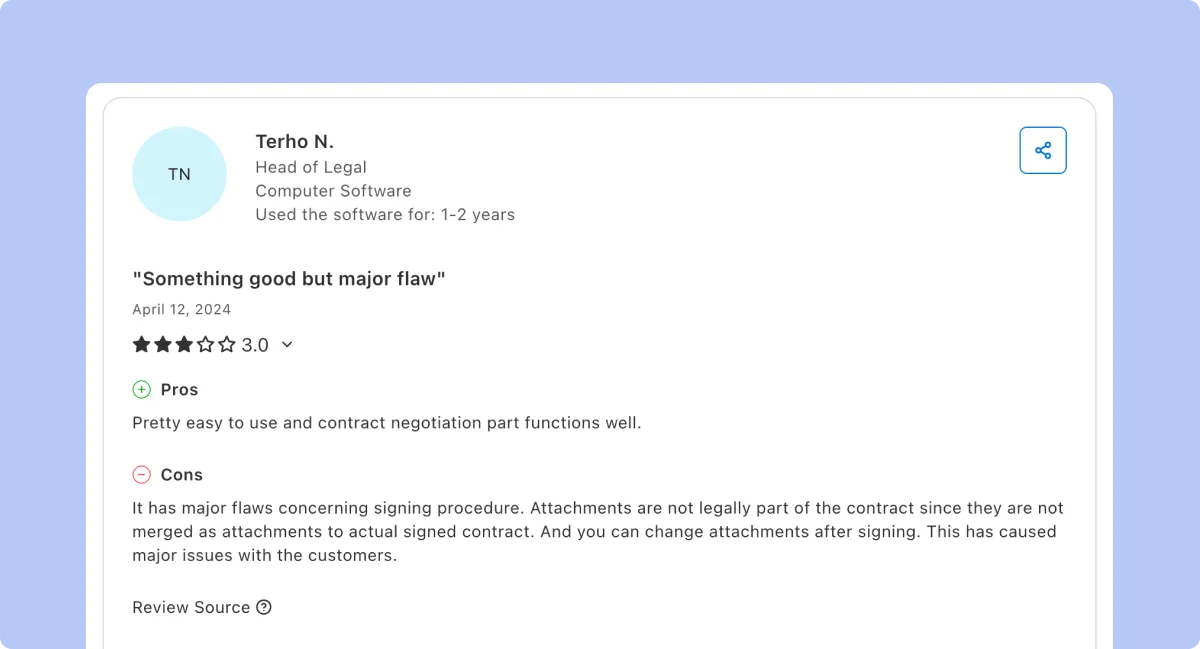
Customer feedback identifies a separate signing scenario for evaluation. In an April 2024 review, a Juro customer praised the contract negotiation experience but reported problems with attachments to signed agreements. According to the customer, attachments were not merged into the signed document and remained editable afterward.
This historical customer report does not establish Juro's current product behavior. During evaluation, test how supporting documents are included in the signing process, stored, and protected against changes after execution.
An April 2025 Ironclad customer reported a positive experience with audit trails when sending quotes but described difficulty locating specific workflow steps and messages. The feedback concerned navigation and message threading rather than the absence of audit history.
For agreements involving several reviewers, test how users retrieve earlier comments, approvals, and workflow actions from the contract record.
Use the same third-party agreement to test editing in SpotDraft, Ironclad, and Juro. Exchange redlines in Microsoft Word, upload a revised document, and compare the recorded versions. Then retrieve an earlier comment and the final signed agreement. Include external counsel access and supporting documents if those form part of the organization's contracting process.
Implementation and time to value
Juro publishes a four-stage implementation process covering pre-sales, onboarding, activation, and adoption. According to Juro, onboarding currently averages 21 days, with a target of activating customers within 30 days. Its Legal Engineers work with customers on contract templates, integrations, training, and workflow configuration.
SpotDraft provides in-house implementation covering contract templates, workflow configuration, integration setup, and legacy-contract migration. According to its published pricing page, these services are included without separate implementation fees. Its implementation team also supports onboarding and training.
Ironclad documents three deployment options: customers can lead implementation themselves, work with Ironclad's legal engineers, or engage an implementation partner. The selected approach should be identified in the commercial proposal, along with the associated configuration and professional services.
For the SpotDraft vs Ironclad vs Juro implementation comparison, request a project plan identifying template configuration, legacy-contract migration, integrations, user training, administrator responsibilities, and post-launch support. The plan should distinguish vendor-delivered services from work assigned to internal resources or implementation partners.
Compare the implementation period only after defining the same deployment scope. Juro's published onboarding average, Ironclad's deployment options, and SpotDraft's in-house services describe different parts of implementation. Each proposal should specify the milestones and deliverables required before go-live.
During a personalized demo, use one representative contract type, its approval workflow, a required integration, and a sample of legacy agreements to establish implementation requirements. Document who configures each component, the acceptance criteria for deployment, and the team responsible after go-live.
The implementation scope should also feed into the first-year cost comparison, including vendor charges and the internal time allocated to deployment.
SpotDraft, Ironclad and Juro support configurable workflows for contract creation and approval routing. Business teams using complex workflows should test how each system defines conditions, assigns reviewers, and responds to changes in active agreements.
Juro supports self-service contract creation through templates, approvals, and conditional logic. Juro states that administrators can create or change workflows without code following implementation.
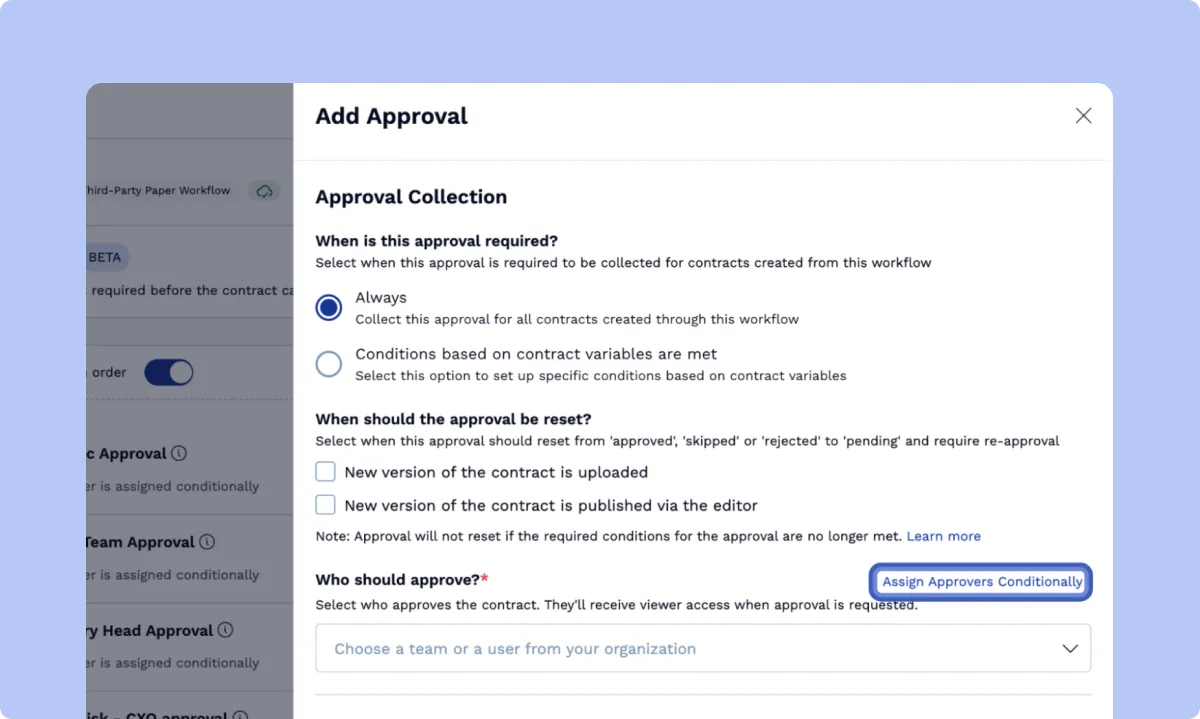
SpotDraft Workflows supports contract creation, review, approval routing, and signing rules. Administrators can assign approvers according to contract variables and define conditions for when approvals are required. They can also configure how approvals respond to new document versions.
These settings connect approval administration with the wider contract management workflow, including the movement of agreements through review and execution.
Ironclad also documents Administrator, Standard, Sell-Side, Buy-Side, Intake, and Salesforce-related user entitlements. Buyers should identify the required user types, modules, and permissions when comparing workflow configuration and subscription scope.
Ask an administrator to use each workflow builder to make simple changes: revise a template used for contract generation, add a conditional approval, and reassign a reviewer. Document the permissions required, the steps involved, and the effect on agreements already in progress.
For example, configure a supplier agreement that requires Finance approval above a specified contract value. Change the value after the agreement enters review and inspect whether the approval requirement updates. Then upload a revised contract to test whether completed approvals reset according to the configured rules.
Record the configuration steps and administrator permissions required in each platform. Use the results to assess whether administrators face a steep learning curve rather than assuming one based on the number of workflow settings.
AI-assisted contract review, agents, and usage limits
SpotDraft, Ironclad, and Juro offer AI products for contract review, drafting, and contract data analysis. In the legal profession, reviewers need a deep understanding of the legal landscape relevant to an agreement before accepting AI-generated redlines. Buyers should therefore compare playbook context, supporting sources, review controls, and usage allowances across all three platforms.
Juro offers AI Review for reviewing and redlining agreements against user-defined playbooks, AI Assistant for drafting and summarizing provisions, AI Extract for extracting contract data, and Operator for querying agreements through natural language.
Juro's AI fair usage policy, updated August 3, 2026, lists 10 AI Reviews per user every two hours and 500 completed Operator tasks per customer each month. It also limits each bulk AI Extract operation to 200 documents. The policy currently lists no usage limits for individual AI Extract operations or AI Assistant.
Ironclad's Jurist supports contract drafting, playbook-based redlining, risk analysis, and contract questions. Jurist for Microsoft Word provides AI-assisted contract review inside Word, including suggested redlines and playbook-based guidance. The product uses customer-supplied contracts, templates, and playbooks to provide context for its outputs.
Ironclad introduced credit-based usage for eligible AI agents on September 1, 2026. Its documentation identifies Renewal Agent, Intake Agent, Archive Agent, Contract Family Agent, Contract Review Agent, and Analytics Agent among the applicable agents.
Each eligible action consumes credits from a shared account balance. When the balance is exhausted, additional usage is handled through purchased credits, on-demand billing, or a usage pause according to account settings. Ironclad states that this model does not apply to every AI-powered feature. Its published documentation lists a default on-demand rate of $1 per credit when the AI Credit Cap is disabled.
SpotDraft provides VerifAI for playbook-based contract review, with suggested comments and redlines in Microsoft Word. Sidebar supports legal research, contract questions, policy guidance, clause drafting, and regulatory tracking. Its Policy Agent draws on organizational knowledge stored in Knowledge Hubs. When reviewing research that references case law or law journals, verify the citations against the original sources.
These capabilities address different requirements within AI contract management software. Buyers should distinguish playbook-based contract review from legal research, policy queries, and other agent tasks when comparing product access, controls, and usage allowances.
For the SpotDraft vs Ironclad vs Juro AI evaluation, review the same third-party agreement against an approved negotiation playbook. Compare the clauses identified, proposed redlines, explanations, source references, and reviewer controls. Then estimate monthly usage and identify the products, credits, limits, and additional charges applicable to each proposal.
The results should document both the contract review outputs and the commercial allowance required for production use.
Juro includes Slack, Email, Google Drive, and Microsoft Word integrations across its Essentials, Growth, and Enterprise plans. The Juro Growth plan adds integrations including HubSpot, Docusign, Greenhouse, and Zapier. The Juro Enterprise plan adds Salesforce, REST API access, and webhooks.
Juro states that certain integrations, including Salesforce, HubSpot, and Workday, incur additional costs. Buyers should distinguish an integration's plan availability from its commercial inclusion in the proposed subscription.
Ironclad documents Salesforce functionality, API access, storage connections, and integrations with business systems such as Coupa and OneTrust. Its Salesforce integration supports initiating contract workflows and connecting contract information with CRM records. The Order Form should identify the relevant modules, API entitlements, and integrations included.
SpotDraft's integration catalog includes Salesforce and HubSpot for CRM-connected contracting, Slack for collaboration, and Coupa for procurement workflows. It also lists Microsoft Word, Greenhouse, Jira, and Microsoft Teams among its available integrations.
The required integrations should be mapped to the actual contracting process. For example, Sales may initiate agreements from Salesforce while Procurement uses Coupa to manage supplier-related workflows.
For SpotDraft vs Ironclad vs Juro, test the integrations required for the same contract process. Initiate an agreement from Salesforce, route it for Legal approval, and verify which contract metadata returns to the CRM after signing. Check field values against the executed agreement, then document access permissions, implementation responsibilities, and any additional integration charges.
Pricing and total cost
SpotDraft, Ironclad, and Juro use custom pricing rather than publishing standard subscription rates for every CLM deployment. Their pricing structures rely on different commercial inputs, so buyers should compare proposals against identical functionality, usage, implementation, and support requirements.
Juro offers Essentials, Growth, and Enterprise plans, each with unlimited users, workflows, and templates. According to Juro, its pricing is based on contract volume and integration complexity rather than a standard per-user subscription fee. Its published plan information states that these plans are billed annually.
Buyers should establish expected contract volume, required integrations, and applicable AI usage before reviewing the proposed package. The Juro pricing guide explains the commercial inputs and plan structure in more detail.
SpotDraft offers custom pricing based on users or contract volume. Its published pricing model includes in-house implementation, workflow and integration setup, legacy-contract migration, dedicated customer success, and 24/7 support.
The commercial proposal should identify the selected pricing basis, included products, usage allowances, and any optional services. This establishes the subscription and implementation scope for comparison with Ironclad and Juro.
Juro's published standard Master Services Agreement identifies Juro Online Limited as a contracting party. For all three vendors, procurement should confirm the legal entity on the Order Form, subscription term, billing frequency, renewal conditions, implementation commitments, and service-level provisions.
Ironclad defines purchased products, quantities, and fees in the customer's Order Form. Its documentation identifies user and module entitlements, API access, integrations, optional environments, security products, Success Plans, and AI-related commercial terms.
Buyers should document the included components and charges when reviewing Ironclad pricing, including implementation services and usage-based fees.
The total cost comparison should account for the complete deployment scope, including services required before and after launch.
The total cost of ownership should include:
Software subscription
Implementation services
Legacy-contract migration
Professional services
Integrations and API access
AI products and usage
Training and support
Future expansion
When comparing SpotDraft with Juro or Ironclad, use the same contract volumes, user-access requirements, implementation deliverables, integrations, and support expectations. Account for internal staff time separately from vendor charges to establish the complete first-year cost.
Public pricing information does not establish which product costs less in a Juro vs Ironclad comparison or how either compares with SpotDraft. Evaluate each quote against purchased functionality, services, and usage allowances rather than the subscription amount alone.
For budget approval, use a contract management ROI framework to compare the proposed investment against measurable changes in drafting time, approval turnaround, contract administration, and renewal management.
SpotDraft, Ironclad, and Juro support contracting across business functions. Large enterprises evaluating enterprise CLM should compare user entitlements, integration access, reporting requirements, support coverage, and the services required as deployment expands.
The Juro Enterprise plan includes Salesforce integration, REST API access, webhooks, and enterprise administration capabilities. Juro reports customers operating across more than 85 countries. Buyers should define the user access, integrations, support services, and deployment requirements included in their proposed Juro Enterprise subscription.
Ironclad's commercial documentation identifies Power Users, module-specific access, API entitlements, Salesforce functionality, optional non-production environments, security products, and Success Plans. Each purchased component should be documented in the Order Form, including access rights and services assigned to different business functions.
SpotDraft states that dedicated customer success and 24/7 support are included in its pricing model. Its Contract Analytics product provides reporting on contract lifecycle activity, approval requests, review workloads, and turnaround times.
These reports provide Legal Operations with metrics for monitoring contract processes across departments. Buyers should document the reporting permissions, support requirements, and access controls needed after rollout.
Request the customer support channels, response targets, and escalation procedures from all three vendors. Ask each support team to resolve one workflow administration issue during the proof of concept and document response ownership and time to resolution. Use the results to evaluate the quality of support against the service-level terms in each proposal.
SpotDraft vs Ironclad vs Juro: Which CLM Fits Your Requirements?
Organizations considering Ironclad or Juro alongside SpotDraft should base their decision on their contract workflows, implementation resources, integration requirements, and commercial scope. Assess each platform's documented capabilities against the same procurement criteria.
Evaluate Juro for unlimited user access and contract-volume-based pricing
Juro is an option for organizations seeking unlimited users, workflows, and templates under a contract-volume-based pricing model. Its commercial structure allows procurement to assess contract volumes and integration requirements without using a standard per-user license fee.
Juro supports browser-based contracting and Microsoft Word editing. Teams should test third-party document exchanges, formatting preservation, signing attachments, and version synchronization.
Juro's four-stage implementation process includes assistance from its Legal Engineers. The proposed project plan should define the templates, integrations, contract data, training, and internal responsibilities required for the organization's deployment.
Procurement should compare the proposed Juro Essentials, Growth, or Enterprise plan against expected contract volume, AI usage, integration requirements, and support coverage. A separate SpotDraft vs Juro comparison documents additional product-level evaluation criteria.
Evaluate Ironclad for configurable workflows and enterprise access
Ironclad is an option for organizations evaluating Workflow Designer configuration, role-specific access, and deployment choices across multiple contract types and business functions.
Ironclad Workflow Designer supports launch forms, workflow roles, approval routing, permissions, templates, and configurable conditions. Buyers should test these controls against representative contract workflows and identify the administrator permissions and user entitlements required.
For deployments covering Legal, Sales, Finance, and Procurement, the implementation plan should document the workflow modules, integrations, and user access required by each department.
The Ironclad Order Form should define the purchased products, user and module access, API entitlements, integrations, implementation services, Success Plan, AI usage, and optional environments. The SpotDraft vs Ironclad comparison provides additional product-level information.
Evaluate SpotDraft for in-house implementation and connected contract workflows
Teams considering SpotDraft as an Ironclad alternative can test two tasks: tracking successive contract versions and changing approver assignments. For lean legal teams, these tests also show which steps require administrator involvement. Use the same agreements in Ironclad and Juro to compare the workflows.
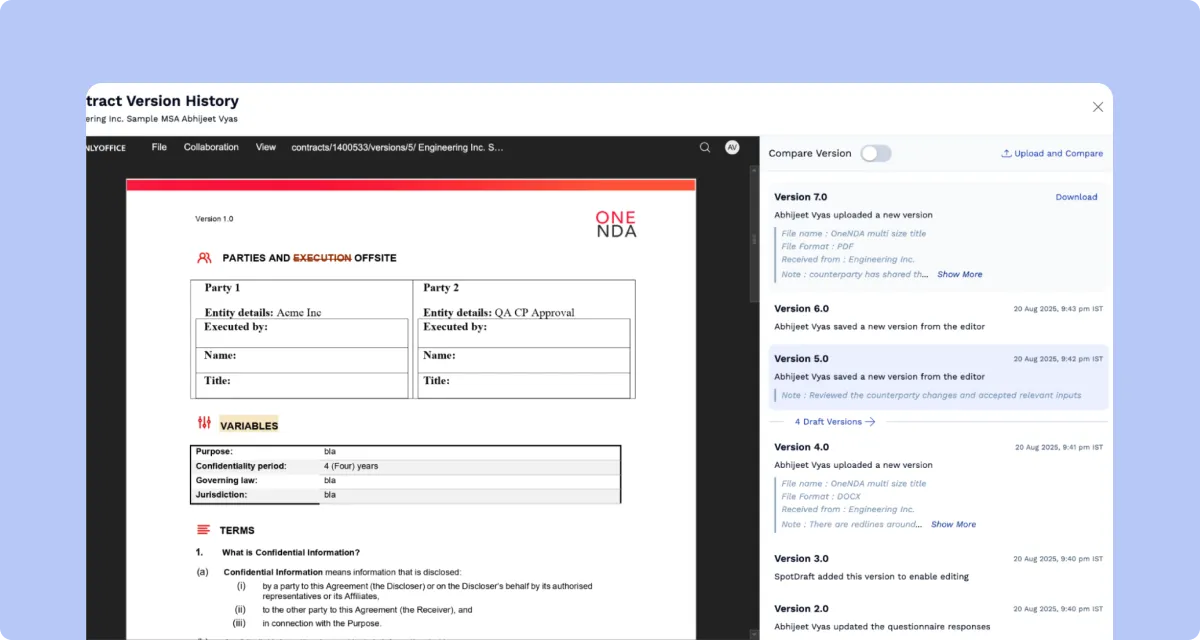
Contract owners who spend a lot of time reconstructing document changes from email attachments can test SpotDraft's Version History with an agreement that has several rounds of revisions. It records successive drafts, including versions created through editing and counterparty uploads. Users can open earlier versions, inspect the timeline, and select versions for comparison.
SpotDraft's approval configuration supports mandatory and condition-based approvals. Administrators can assign approvers according to contract variables and configure whether uploading or publishing a new document version resets completed approvals. These settings define how approval requirements respond to contract information and document changes.
After approval, SpotDraft Sign supports electronic execution within the contract workflow, linking signing activity to the agreement.
The executed agreement is stored in SpotDraft's Contract Repository, which supports full-text search, metadata filtering, and access to contract records.
Contract Analytics provides reporting on approval requests, review activity, and turnaround times. These metrics support post-deployment monitoring of contract workloads and process performance.
These capabilities span the entire contract lifecycle, from editing and approvals through signing, storage, and reporting. The implementation and pricing sections above document the services and commercial requirements to compare with Ironclad and Juro.
The final procurement comparison should record the same technical test results, implementation responsibilities, and commercial requirements for all three platforms.
Frequently Asked Questions
What is the difference between SpotDraft, Ironclad, and Juro?
Is SpotDraft cheaper than Ironclad or Juro?
How do SpotDraft, Ironclad, and Juro compare on implementation?
What should smaller legal teams compare across SpotDraft, Ironclad, and Juro?
How do SpotDraft, Ironclad, and Juro compare on AI?
Do SpotDraft, Ironclad, and Juro support native electronic signatures?
Related content
latest
Best Contract Templating Tools Compared for 2026
Compare 8 contract templating tools on conditional content, multi-variant templates, approvals, CRM generation and pricing for in-house legal teams.
“Before using SpotDraft, executing a contract would take up to weeks. Now, contracts are signed within minutes, with better data security and tracking. The whole process takes us less than a day!”
Arti Singh
Founder’s Office, Growth, UrbanVault
“Before using SpotDraft, executing a contract would take up to weeks. Now, contracts are signed within minutes, with better data security and tracking. The whole process takes us less than a day!”