Bar associations, legal publishers and many CLM vendors publish free starter templates. Treat them as first drafts and have your counsel adapt them before use.
What Is a Contract Generation Tool?
A contract generation tool creates contracts from approved templates by filling in deal data from a form or CRM. Most also apply clause rules and route drafts for approval.
Which Tools Support Conditional Content and Multi-Variant Templates From One Workflow?
SpotDraft supports conditional templates with no-code rules, and customers like Astronomer use pre-approved template variations. According to the vendors, Juro and Ironclad offer conditional logic, so test variant handling in a live demo.
What's the Best Option for Small Businesses?
Small sales teams sending proposals often start with PandaDoc's published tiers. Growing teams that need Legal to control clauses and approvals should consider a legal-first tool like SpotDraft.
How Long Does Implementation Take?
It depends on the vendor and your scope. SpotDraft's onboarding path runs from discovery and planning in Week 1 to a live system by Week 6.
Huzaifa Sultana is a Marketing Associate at SpotDraft, specializing in organic growth, SEO, and AEO. Her work focuses on content optimization, keyword research, and developing strategies to improve search rankings and organic visibility.
TL;DR
Contract templating tools build contracts from Legal-approved templates, clauses and rules, then route them for approval.
Conditional content switches clauses on or off by rule, like deal value or governing law.
Multi-variant templates give you pre-approved fallback versions of the same clause or contract.
The real test is whether one master template handles both, inside one workflow.
SpotDraft, Juro, Ironclad, DocuSign CLM, Conga, PandaDoc, Agiloft and Icertis all take different approaches.
Most vendors quote custom pricing, so budget for implementation, integrations and admin time.
Run a five-question demo script and pilot one contract type before you buy.
It's Friday afternoon, and a sales rep just sent you an MSA for "a quick look." It's built on last quarter's Word file, with a liability cap you retired months ago. Sound familiar?
Contract templating tools fix this by putting Legal in charge of one approved source for every contract. The catch is that most roundups list features without testing the thing you actually need. Can one template handle conditional content and multi-variant clauses from a single workflow?
That's the test this guide uses. It's written for in-house counsel, legal ops leads and GCs comparing contract automation options.
What Are Contract Templating Tools?
Contract templating tools are software that builds contracts from Legal-approved templates, clauses and rules. They fill in deal data from a form or CRM, apply the right language and route the draft for approval. Business teams get a ready contract, and Legal keeps control of every word.
That's a big step up from a shared folder of Word templates. Word can't stop someone from editing a locked clause or picking last year's version. It also can't send a draft to Finance when the discount crosses a threshold.
Templating also differs from eSignature-only tools. Those tools are great at getting a final PDF signed, but they don't help you draft it. You'll usually see three patterns in this market:
eSignature-led tools add templates and data merge on top of signing.
Sales document tools focus on proposals, quotes and simple agreements.
Full CLM platforms cover drafting, approvals, negotiation, signature, storage and analytics.
If you're comparing contract generation software or contract creation software, you're looking at the same category. The best automated contract creation tools let business teams self-serve while language stays governed by Legal.
What Are Conditional Content and Multi-Variant Templates?
These two terms get mixed up a lot, and they solve different problems. You need both if you want one template to cover many deals.
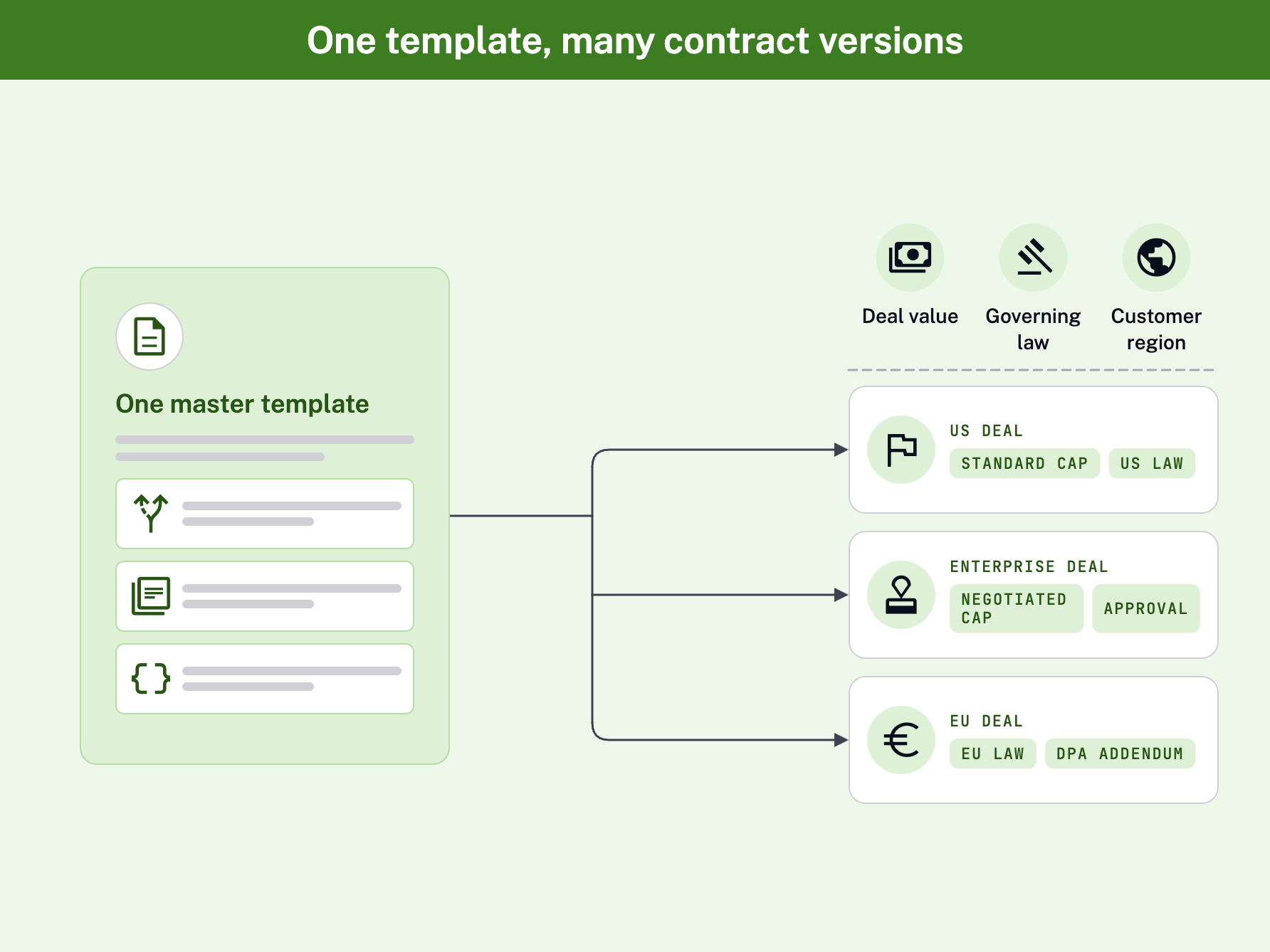
Conditional content means clauses appear, disappear or change based on answers to questions. For example, "Is the deal over $100K?" or "Which governing law applies?" The tool reads the answer and pulls in the right language automatically.
Multi-variant templates give you pre-approved versions of the same clause or template. Think standard liability cap, negotiated cap and GC-only cap. Reps pick from approved options instead of rewriting terms, which keeps redlines consistent. You can learn more about using templates for negotiation consistency.
Why "From One Workflow" Matters
Without these features, you end up with 12 Word files for one MSA. There's a US version, an EU version, an enterprise version and a few "special" ones nobody remembers approving. Each new file is another chance for an outdated clause to slip through.
With template workflows, you keep one master template. The rules decide which clauses show up, and the variants decide which fallback is allowed. Here's how that plays out:
Intake question
Answer
Clause outcome
Deal value over $100K?
Yes
Negotiated liability cap, routed for GC approval
Deal value over $100K?
No
Standard liability cap
Governing law?
New York
NY law clause
Governing law?
England
English law clause
Customer in the EU?
Yes
DPA addendum included
UrbanVault faced exactly this problem with contracts that shift by landlord, vendor and client. After moving to SpotDraft, the team reported 25% fewer contract-related errors.
"At UrbanVault, contracts are tailor-made depending on the landlord, the vendor, the client. But SpotDraft has helped us achieve standardization, while also handling deviations."
Amal Mishra, UrbanVault
Co-founder & CEO, UrbanVault
What Features Should You Look for in Contract Templating Tools?
Not every contract authoring tool handles the hard parts. Use these seven criteria to separate real contract automation tools from glorified mail merge.
There's good reason to get this right now. CLOC's 2025 State of the Industry report found 66% of responding legal departments rated automating legal processes a high priority.
#1 No-Code Conditional Logic
You should be able to build rules without a developer. Look for simple "if this, then that" builders tied to intake questions. If every rule change needs a ticket to IT, your templates will go stale fast.
#2 Clause Library With Approved Variants
A strong clause library stores your gold-standard language plus approved fallbacks. That way, reps can swap a clause without writing anything new. Start with this guide to building a clause library.
#3 Intake Forms and Self-Serve
Business users shouldn't need to open the template at all. A short form should ask the right questions and generate the contract. This is what takes routine NDAs off your desk.
#4 Approval Routing
The tool should route drafts to the right approver based on rules. A big discount goes to Finance, and a non-standard cap goes to the GC. You shouldn't be chasing approvals over email.
#5 CRM-Based Generation
Sales teams live in Salesforce or HubSpot. If they can create contracts there, adoption goes way up. Check that deal fields map straight into the template.
Few roundups cover this one, but it matters. HR, partnerships and finance teams often need hundreds of near-identical contracts at once. Think offer letters, ESOP grants or partner agreements.
#7 Governed AI and Audit Trail
AI can speed up drafting, but it has to follow your rules. Look for AI that works from your approved templates and playbooks. You'll also want a full audit trail of who changed what.
Best Contract Templating Tools Compared: At a Glance
Here's how eight popular contract tools stack up on conditional content and multi-variant templates.
Tool
Best for
Conditional content
Multi-variant templates
Pricing approach
SpotDraft
In-house legal enabling self-serve
No-code rules by deal value or governing law
Legal-configured templates and clause rules
Custom quote
Juro
Browser-native contracting
Intake forms mapped to templates and approval rules
Confirm in demo
Custom plan
Ironclad
Legal-led workflow design
Workflow designer with conditional logic
Confirm in demo
Tailored proposal
DocuSign CLM
Teams already on DocuSign eSignature
Templates with CRM data merge
Confirm in demo
Custom quote
Conga
Salesforce and CPQ-driven sales
Generation driven by Salesforce and CPQ data
Confirm in demo
Custom quote
PandaDoc
Sales proposals and quotes
Built for proposals and quotes
Confirm in demo
Published tiers
Agiloft
Teams wanting deep configuration
Highly configurable, no-code
Confirm in demo
Custom quote
Icertis
Large, regulated enterprises
Multi-jurisdiction governance
Confirm in demo
Custom quote
#1 SpotDraft
SpotDraft is an AI-native CLM built so Legal can control language while business teams self-serve. SpotDraft's contract templates feature lets you set rules that adjust language by deal value or governing law.
Best for: In-house legal teams that want business users to self-serve contracts.
Conditional content: No-code rules adjust clauses by deal value, governing law and other criteria.
Multi-variant: Legal configures compliant templates; see the Astronomer example below for pre-approved variations in practice.
Workflows: Intake forms, Salesforce and HubSpot generation, automated approvals, reminders and status tracking.
Extras: Instant Agreements via public URLs, Campaigns for bulk generation and AI that follows your rules.
Check in your demo: Whether you need a full CLM platform or a lighter, drafting-only tool.
Pricing approach: Custom quote.
You can set up approvals with no-code contract workflow automation, so drafts reach the right people automatically. SpotDraft's onboarding path runs from discovery and planning in Week 1 to a live system by Week 6.
At Astronomer, sales reps draft NDAs and MSAs from pre-approved templates with pre-negotiated variations. They don't need to loop in Legal for routine deals.
"SpotDraft is the anchor in our contracting process. It unified everything — drafting, negotiation, signature, repository — all in one place. And it works where our teams already work."
Nicole Ducharme
Director of Legal Operations & Contracts, Astronomer
The right contract generation software depends on who creates most of your contracts. Here are quick picks by use case.
In-House Legal Enabling Self-Serve
If your goal is to get routine contracts off your desk, pick a legal-first platform. SpotDraft is built for legal-controlled self-serve, and Juro and Ironclad also position themselves for legal teams. Test which one lets you build conditional content and variants without outside help.
At Odessa, the sales team reached 100% adoption in Salesforce after moving to SpotDraft. Here's how their GC put it:
"Since rolling out SpotDraft, our sales team hasn't logged a single contract complaint, no small feat given our previous tool challenges."
Sanjay Kumar
Senior VP Legal & General Counsel, Odessa
Enterprise and Regulated Teams
Large companies with many entities and jurisdictions need strong governance. According to the vendors, Icertis focuses on enterprise governance and Agiloft on deep configuration. SpotDraft is designed for mid-market and enterprise teams, including regulated companies that need ISO 27001, SOC 2 and GDPR-compliant solutions.
Small Teams
If you mostly send proposals and quotes, PandaDoc's published tiers make it easy to start. Once Legal needs tighter control over clauses and approvals, it's time to look at a legal-first tool.
How Do You Create a Contract Template in a Templating Tool?
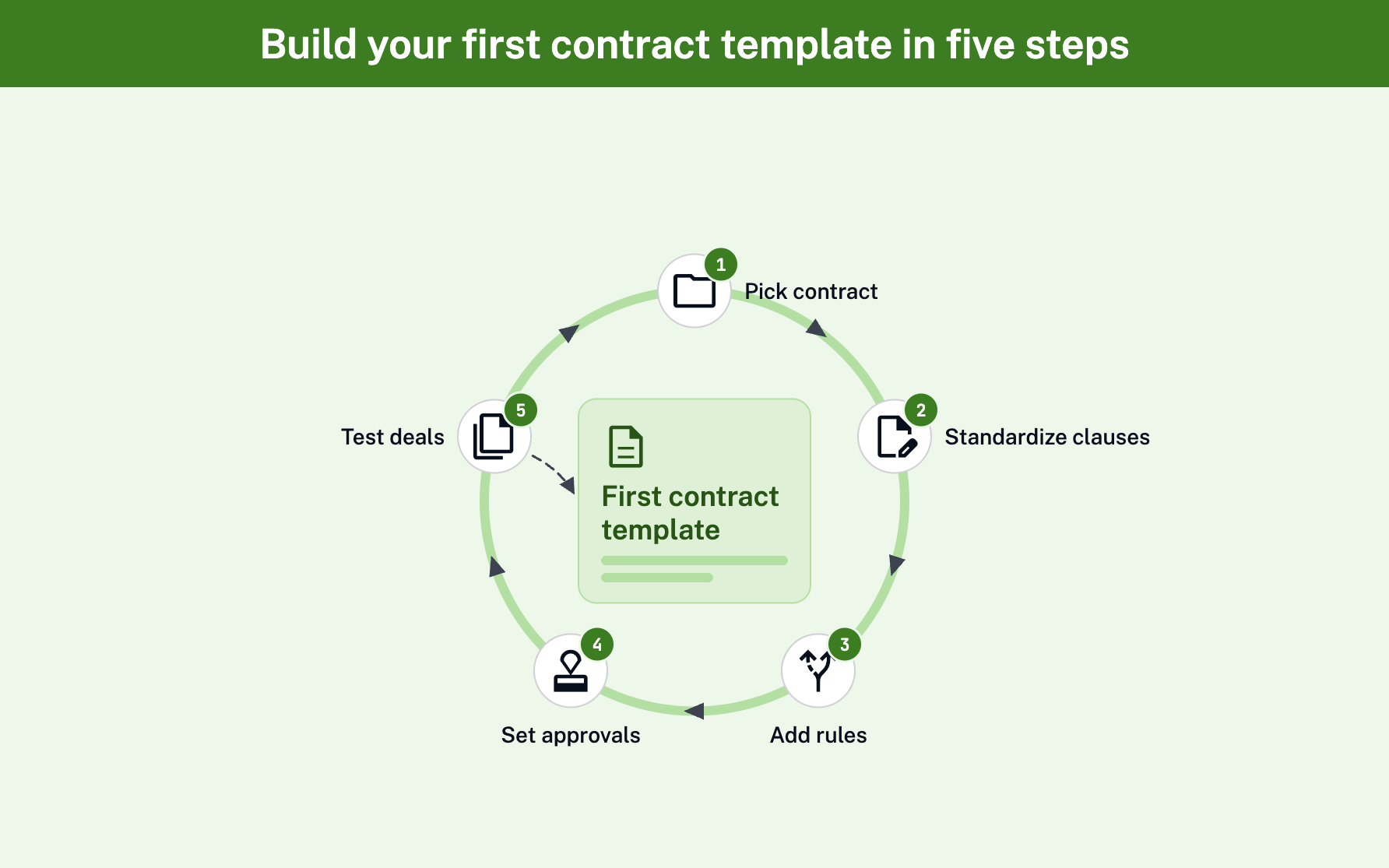
You don't need to automate everything at once. Start with one contract, get it right and expand from there. These five steps work in almost any contract templating tool.
#1 Pick One High-Volume Contract
Choose a contract you see every week, like an NDA or MSA. Confirm how many you send and who owns the language. That gives you a clear baseline to measure against.
#2 Standardize the Clauses
Gather every live version of that contract and pick one gold-standard clause set. Then write approved fallbacks for the clauses people negotiate most. You're done when you have one gold version plus fallbacks.
#3 Add Conditional Rules
Map every variable in the contract to an intake question. Deal value, governing law and region are the usual suspects. Each answer should trigger the right clause automatically.
#4 Set Approval Routing
Decide which changes need sign-off, and from whom. Assign thresholds to approvers, like Finance for discounts and the GC for liability changes. This guide to contract approval workflow setup walks through the details.
#5 Test With Real Deals
Run three real scenarios through the template before launch. Try a small deal, a large deal and an EU deal. If all three generate correctly, you're ready to roll it out.
How Much Do Contract Templating Tools Cost?
Pricing for a contract tool usually follows one of two models. Some vendors, like PandaDoc, publish pricing tiers. Most CLM vendors, including SpotDraft, Juro, Ironclad and Icertis, give a custom quote based on your needs.
The license is only part of the cost. Watch for these extra line items:
Implementation: Setup, template migration and training time.
Integrations: CRM, HRIS or storage connections that may cost extra.
Admin time: The hours your team spends maintaining templates and rules.
Before you sign, ask each vendor a few direct questions. What's included in implementation? Which integrations cost extra? Who maintains templates after go-live, you or them?
Contract Templating Tools vs. Full CLM Platforms: What's the Difference?
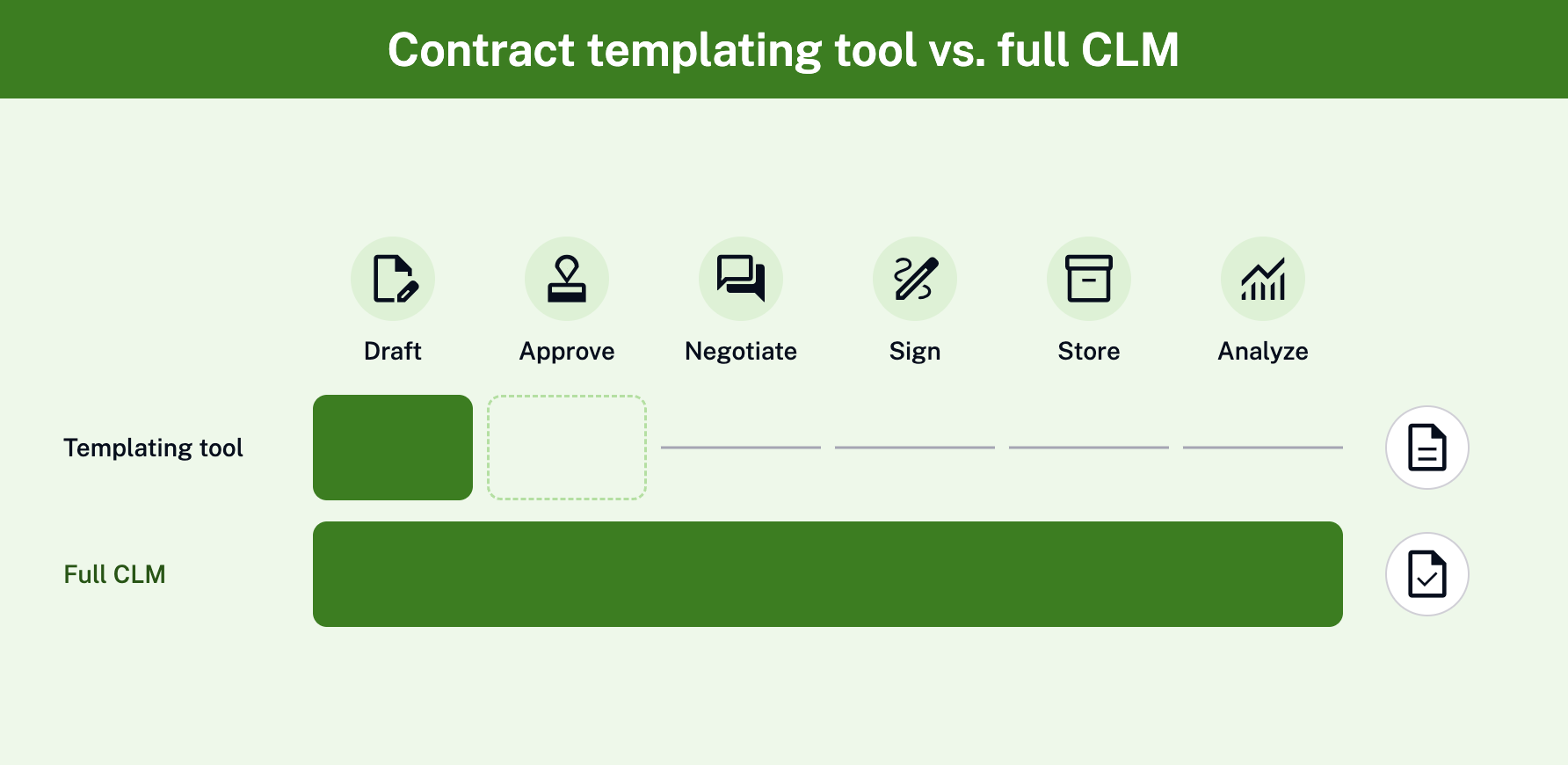
A templating-only tool handles the drafting stage. A full CLM handles the whole contract lifecycle, before and after signature. Here's how the two categories typically compare:
Capability
Templating-only tool
Full CLM platform
Drafting from templates
Yes
Yes
Approvals
Sometimes basic
Rule-based routing
Negotiation and redlining
Limited
Built in
eSignature
Often via a partner tool
Built in or integrated
Repository
Limited
Searchable, with access controls
Analytics
Limited
Renewals, bottlenecks and workloads
A templating-only tool fits if you just need faster first drafts. A full Contract Lifecycle Management Software (CLM) fits if you also want negotiation, signature and post-signature visibility in one place. With end-to-end contract automation software, the data you capture at drafting stays useful later.
That's where a searchable contract repository earns its keep. You can find any clause, renewal date or past negotiation in seconds.
How Do You Choose and Roll Out a Contract Templating Tool?
Demos are polished by design. To see how a tool really works, bring your own contract and run a "one workflow" test.
#1 Run the One-Workflow Demo Script
Ask each vendor to build one of your MSAs live and answer these five questions:
Can you add a rule that swaps the liability cap when deal value crosses $100K?
Can you switch governing law with one intake answer?
Can a rep pick an approved fallback clause without editing the text?
Does a non-standard choice route to the right approver automatically?
Can a rep generate the same contract from the CRM deal record?
If the vendor needs separate templates or custom code to pass, that tells you a lot.
#2 Pilot One Contract Type
Start with the high-volume contract you picked earlier. Roll it out to one team first, gather feedback and fix the rough edges. Then expand to the next contract type.
#3 Measure Cycle Time and Adoption
Track how long contracts take from request to signature, before and after launch. Also track how many contracts business teams create without Legal's help. These two numbers show whether the tool is working.
Wingify is a good example of what to measure. Using SpotDraft's Salesforce integration, the team cut contract cycle time by 65%. They also created 75% of contracts directly in Salesforce.
Is AI-Generated Contract Language Legally Reliable?
AI-generated contract language is reliable when it's grounded in your approved templates and playbooks, with a lawyer reviewing the output. It's risky when AI drafts freely from public data with no rules. The difference comes down to governance.
Before you trust any AI-powered contract authoring tool, check three things:
Data use: Confirm your contracts won't be used to train public models.
Rules: Confirm the AI follows your templates, clause library and playbooks.
Review: Confirm a human approves AI output before it reaches a counterparty.
SpotDraft offers Risk free AI - on your terms. Its AI-powered contract drafting is designed to understand context, follow your rules and keep your data secure.
Conclusion
Contract templating tools give Legal one approved source for every contract, so no one edits last quarter's Word file again. The strongest options handle conditional content and multi-variant templates from one workflow. They also route approvals and let business teams self-serve from the CRM.
Your next step is simple. Shortlist two or three tools, run the five-question demo script with your own MSA and pilot one contract type. Measure cycle time and adoption, then expand.
Want to see conditional templates, approvals and CRM generation working together? Request a demo.
Frequently Asked Questions
Where Can I Find Free Contract Templates?
What Is a Contract Generation Tool?
Which Tools Support Conditional Content and Multi-Variant Templates From One Workflow?
What's the Best Option for Small Businesses?
How Long Does Implementation Take?
Related content
latest
Top 12 Conga Competitors & Alternatives for Contract Management
Compare 12 Conga competitors & alternatives for contract management in 2026 by use case, workflows, migration, and fit for your Conga setup.
“Before using SpotDraft, executing a contract would take up to weeks. Now, contracts are signed within minutes, with better data security and tracking. The whole process takes us less than a day!”
Arti Singh
Founder’s Office, Growth, UrbanVault
“Before using SpotDraft, executing a contract would take up to weeks. Now, contracts are signed within minutes, with better data security and tracking. The whole process takes us less than a day!”